
How To Clean Corrosion On Battery Terminals
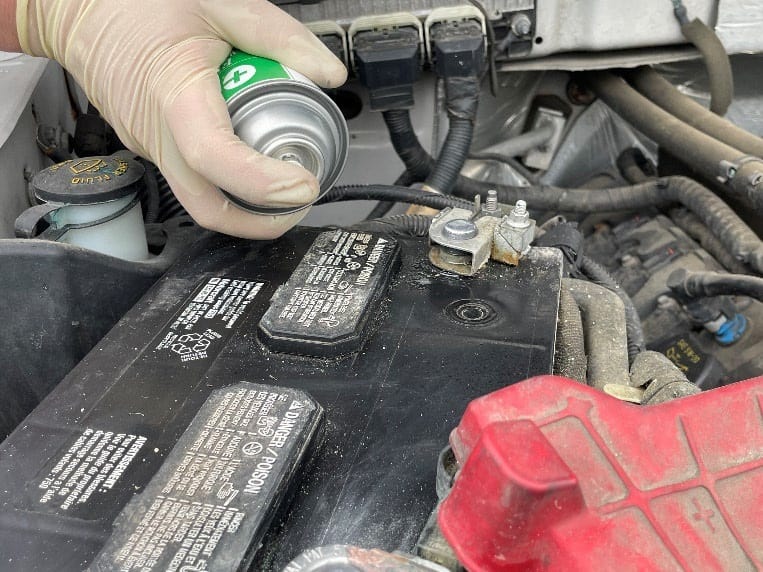
Battery terminal corrosion: it's the bane of every car owner's existence at some point. That white, blue, or green fuzzy buildup not only looks unsightly, but it's a major performance killer. It increases resistance, reduces current flow, and can eventually lead to a no-start situation. As an experienced DIYer, you likely already know the basics, but let's dive deep into why corrosion happens, how to safely and effectively clean it, and how to prevent it from recurring.
Understanding Battery Terminal Corrosion
Corrosion on battery terminals is primarily caused by a chemical reaction called electrochemical corrosion. This process involves the flow of electrons and ions between the battery's terminals, the electrolyte within the battery, and the surrounding metallic components. The electrolyte, usually sulfuric acid in lead-acid batteries, can vent or leak as a vapor around the terminals. This acid reacts with the metals of the terminal (typically lead, copper, or a combination thereof) and the connecting cables, forming metal salts.
Several factors exacerbate this process:
- Outgassing: Overcharging or simply age can cause the battery to release hydrogen and oxygen gases. Some of these gases can react to form moisture, which then combines with the acid.
- Electrolyte Leakage: Physical damage to the battery casing or worn seals can lead to electrolyte leaks, directly exposing the terminals and surrounding components.
- Voltage Regulation Issues: A faulty voltage regulator in your car's alternator can cause overcharging, accelerating outgassing and electrolyte breakdown. This is a serious issue that needs immediate attention beyond just cleaning the terminals.
- Environmental Factors: Humidity, temperature fluctuations, and exposure to road salts can all contribute to corrosion.
The most common types of corrosion you'll encounter are:
- Lead Sulfate (PbSO₄): This appears as a white or yellowish powder. It's formed from the reaction of lead with sulfuric acid.
- Copper Sulfate (CuSO₄): Often seen as blue or greenish crystals, this is a product of copper cable terminals reacting with sulfuric acid. Copper sulfate is also toxic, so avoid skin contact and inhalation.
Safety First: Preparing to Clean Corrosion
Before you even think about touching anything, prioritize safety. Batteries contain sulfuric acid, which is corrosive and can cause burns. During cleaning, you're also working around electrical components, so precautions are paramount.
- Gather Your Supplies: You'll need:
- Safety Glasses: Essential to protect your eyes from splashes.
- Gloves: Acid-resistant gloves, such as nitrile or rubber gloves, are a must.
- Baking Soda: A neutralizer for the acid. Mix it with water to form a paste.
- Wire Brush: A dedicated battery terminal cleaning brush, often with internal and external brushes, is ideal. Stiff bristle brushes work in a pinch.
- Wrench or Socket Set: For loosening and removing the terminal clamps. Use the correct size to avoid rounding off the bolts.
- Clean Rags or Paper Towels: For wiping up messes.
- Battery Terminal Cleaner Spray (Optional): Commercial cleaners contain specialized solvents that can aid in dissolving stubborn corrosion.
- Battery Terminal Protector/Grease (Optional): For preventing future corrosion. Dielectric grease is a good option.
- Distilled Water: For rinsing. Tap water can contain minerals that might contribute to future corrosion.
- Multimeter (Optional): Helpful for checking battery voltage and charging system performance after cleaning.
- Disconnect the Battery: This is crucial to prevent short circuits.
- Loosen the negative (-) terminal clamp first using the appropriate wrench or socket.
- Carefully remove the negative terminal clamp and tuck it away from the battery post, preventing accidental contact.
- Repeat the process for the positive (+) terminal.
- Inspect the Battery: Before proceeding, check for any signs of physical damage to the battery casing. Cracks, bulges, or leaks indicate a serious problem and may require battery replacement. Handle a damaged battery with extreme caution.
Cleaning the Terminals: A Step-by-Step Guide
Now for the cleaning process itself. Remember to work carefully and methodically.
- Apply Baking Soda Paste: Generously coat the corroded terminals and cable clamps with the baking soda paste. The baking soda will neutralize the acid and cause it to fizz. Let it sit for a few minutes to allow the reaction to occur.
- Scrub the Terminals: Use the wire brush to thoroughly scrub the terminals and the inside of the cable clamps. Apply firm pressure and ensure you reach all corroded areas. For stubborn corrosion, you can use the battery terminal cleaner spray in conjunction with the brush.
- Rinse with Distilled Water: After scrubbing, rinse the terminals and clamps thoroughly with distilled water to remove any remaining baking soda residue.
- Dry the Components: Use clean rags or paper towels to dry the terminals and clamps completely. Moisture can promote further corrosion.
- Clean Cable Ends (If Necessary): If the corrosion has extended onto the battery cables themselves, inspect the cable ends. If they are corroded, you may need to replace them. However, if the corrosion is minor, you can clean them with a wire brush and baking soda paste, just like the terminals. Be sure to disconnect the cables completely before cleaning them to prevent short circuits.
- Inspect and Clean Battery Tray: While the battery is disconnected, take the opportunity to inspect the battery tray for any corrosion or damage. Clean the tray with a baking soda solution and rinse thoroughly. This will help prevent future corrosion of the battery terminals.
Reconnecting and Protecting the Terminals
With the terminals clean and dry, it's time to reconnect the battery and take steps to prevent future corrosion.
- Reattach the Terminal Clamps:
- Reconnect the positive (+) terminal first, ensuring a tight and secure connection.
- Then, reconnect the negative (-) terminal.
- Tighten the Clamps: Use the wrench or socket to tighten the terminal clamps securely. Avoid overtightening, as this can damage the terminals or the clamps.
- Apply Battery Terminal Protector: Apply a thin layer of battery terminal protector or dielectric grease to the terminals and the inside of the cable clamps. This will create a barrier that prevents moisture and air from reaching the metal, thus inhibiting corrosion.
- Check Battery Voltage: Use a multimeter to check the battery voltage. A fully charged 12-volt battery should read around 12.6 volts or higher. This ensures that the battery is holding a charge and is functioning properly.
- Start the Engine: Start the engine and check the charging system voltage with the multimeter. The voltage should be between 13.5 and 14.5 volts with the engine running. This indicates that the alternator is charging the battery correctly. If the voltage is outside this range, there may be a problem with the alternator or the voltage regulator.
Preventing Future Corrosion
Cleaning the terminals is just the first step. To prevent corrosion from returning, consider these preventative measures:
- Regular Inspection: Periodically inspect the battery terminals for any signs of corrosion. Catching it early makes cleaning much easier.
- Battery Terminal Protectors: Install battery terminal protectors, which are felt washers that soak up acid and neutralize it before it can reach the terminals.
- Proper Ventilation: Ensure that the battery compartment is properly ventilated to allow gases to escape.
- Avoid Overcharging: If you frequently experience corrosion, have your car's charging system checked by a mechanic to ensure that the alternator is not overcharging the battery.
- Consider a Sealed Battery: If you live in a particularly harsh environment, consider upgrading to a sealed or AGM (Absorbent Glass Mat) battery. These batteries are less prone to outgassing and leakage.
By following these steps, you can effectively clean battery terminal corrosion and prevent it from becoming a recurring problem. A little preventative maintenance goes a long way in ensuring your car's electrical system operates smoothly and reliably.