
2013 Kia Optima Backup Camera Replacement
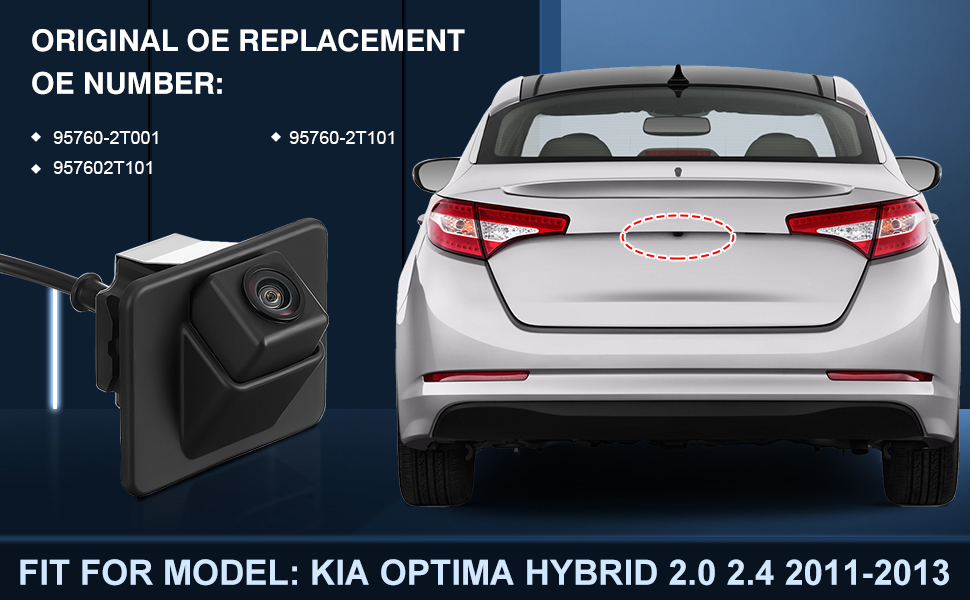
The 2013 Kia Optima, a popular mid-size sedan, often sees its backup camera as a potential point of failure due to age and environmental exposure. This article provides a comprehensive overview of replacing the backup camera in this model, focusing on technical aspects, alternatives, and long-term reliability.
Technical Specifications and Engineering Choices
The OEM backup camera for the 2013 Kia Optima typically operates at 6-12 volts DC and transmits video via a standard composite video signal (RCA). The camera housing is designed to be relatively weatherproof, but prolonged exposure to water, salt, and temperature fluctuations can lead to degradation of the lens, sensor, and internal electronics. The camera's resolution is generally around 640x480 pixels, providing adequate, though not high-definition, visibility. Kia's engineering choice to integrate the camera within the rear trunk lid latch assembly creates a compact design but can complicate replacement, as the entire assembly might need removal.
The internal components of the camera typically include a CMOS or CCD image sensor, a lens with a fixed focal length, and circuitry for processing the video signal and powering the device. The camera's field of view is generally wide-angle, aiming for approximately 130-170 degrees, to maximize rear visibility. Wiring harnesses are typically shielded to minimize interference, but corrosion can still occur, especially at connection points.
Replacement Options: OEM vs. Aftermarket
When replacing the backup camera, automotive professionals face the choice between OEM (Original Equipment Manufacturer) and aftermarket options.
OEM Cameras:
- Pros: Guaranteed compatibility, exact fit, maintains original image quality (if the original quality was satisfactory), and potentially longer lifespan due to manufacturer quality control.
- Cons: Higher cost, may require ordering through a dealership, and installation can still be complex depending on the exact model and trim level.
Aftermarket Cameras:
- Pros: Lower cost, wider range of features (e.g., higher resolution, wider field of view, integrated parking guidelines), and easier availability.
- Cons: Potential compatibility issues, varying quality levels, may require adapter cables or modifications to the vehicle's wiring harness, and may not perfectly match the original aesthetic. Finding a reliable supplier is crucial.
When choosing an aftermarket camera, it's essential to verify compatibility with the 2013 Kia Optima's electrical system and display screen. Consider features like image resolution, viewing angle, low-light performance, and water resistance. Look for cameras that specify compatibility with the Kia Optima or are known to work well with similar Hyundai/Kia models.
Installation Process
The installation process typically involves the following steps:
- Disconnecting the vehicle's battery to prevent electrical shorts.
- Removing the trunk lid trim panels to access the camera wiring and mounting hardware.
- Disconnecting the electrical connector from the existing camera.
- Removing the old camera from its mounting bracket. In some cases, the entire trunk latch assembly needs removal.
- Installing the new camera into the bracket.
- Connecting the electrical connector to the new camera. If using an aftermarket camera, adapter cables may be necessary.
- Testing the camera's functionality before reassembling the trim panels.
- Reinstalling the trunk lid trim panels.
- Reconnecting the vehicle's battery.
Professional installation is recommended, especially if dealing with aftermarket cameras that require wiring modifications. Incorrect wiring can damage the camera, the vehicle's electrical system, or both.
Real-World Performance and Reliability
The real-world performance of a replacement backup camera depends on several factors, including the camera's resolution, lens quality, and low-light performance. High-quality cameras provide clear, crisp images even in dimly lit conditions. A wide viewing angle is also essential for maximizing rear visibility.
Reliability is a significant concern, especially with aftermarket cameras. Look for cameras with a good warranty and positive customer reviews. Consider the camera's environmental protection rating (IP rating) to ensure it can withstand water, dust, and temperature extremes. Regularly inspect the camera lens for dirt and debris, and clean it as needed with a soft cloth. Check the wiring connections for corrosion and repair or replace them if necessary.
Maintenance Tips
- Regular Cleaning: Keep the camera lens clean to ensure optimal image quality.
- Wiring Inspection: Periodically inspect the wiring connections for corrosion and damage.
- Waterproofing: Ensure the camera housing is properly sealed to prevent water intrusion.
- Software Updates: If the camera is integrated with the vehicle's infotainment system, check for software updates that may improve performance. (Less relevant for this specific model year, but generally applicable.)
Future Trends
Future trends in backup camera technology include higher resolution cameras (HD and beyond), wider viewing angles, improved low-light performance, and integration with advanced driver-assistance systems (ADAS). Expect to see more cameras incorporating features like dynamic parking guidelines, object detection, and 360-degree surround-view monitoring. Wireless camera options are also becoming more prevalent, reducing the need for extensive wiring.
Conclusion
Replacing the backup camera in a 2013 Kia Optima requires careful consideration of technical specifications, replacement options, and installation procedures. By choosing a high-quality camera and following proper maintenance practices, automotive professionals can ensure reliable performance and improved safety for their customers. The automotive industry is constantly evolving, and staying abreast of the latest technologies and trends is essential for success.