
2016 Nissan Rogue Dashboard Symbols
The 2016 Nissan Rogue: a comfortable, practical, and surprisingly stylish compact SUV. But what's really going on behind that sleek dashboard? Knowing your way around the warning lights and indicator symbols isn't just good practice; it could save you from a costly repair or even a roadside emergency. This isn't your grandpa's Oldsmobile, so let's dive into the illuminated language of the 2016 Rogue's instrument cluster.
Deciphering the Dashboard: A Symbol by Symbol Breakdown
The 2016 Rogue's dashboard is relatively straightforward, but understanding the nuances between different trims and features is key. We'll break down the common symbols, then highlight the differences between the S, SV, and SL models, as well as variations based on whether you have the standard 2.5L engine or the hybrid powertrain.
Common Symbols: The Universal Language
These symbols are universally found across all 2016 Rogue models:
- Check Engine Light: The dreaded CEL. Shaped like an engine block, it indicates a problem with the engine or emissions system. Don't ignore this; get it checked ASAP.
- Oil Pressure Warning Light: Looks like an oil can. This means critically low oil pressure. Stop driving immediately and check your oil level.
- Battery Warning Light: Shaped like a battery. Indicates a problem with the charging system.
- Brake Warning Light: Often says "BRAKE" or is an exclamation point inside a circle. Could indicate the parking brake is engaged, low brake fluid, or a problem with the braking system.
- ABS Warning Light: "ABS" means there's an issue with the Anti-lock Braking System. Your brakes will still work, but the ABS function won't be active.
- Airbag Warning Light: A side profile of a person with a round circle (airbag) in front of them. Indicates a problem with the airbag system.
- Tire Pressure Monitoring System (TPMS) Light: Looks like a cross-section of a tire with an exclamation point. Indicates low tire pressure in one or more tires.
- Seat Belt Reminder Light: A side profile of a person wearing a seat belt. Reminds you (and your passengers) to buckle up.
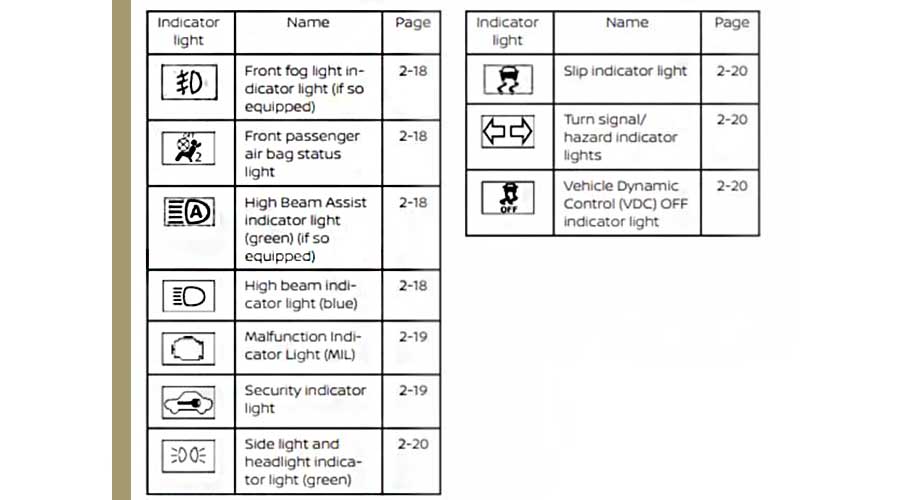
- High Beam Indicator: A headlight symbol with lines pointing forward. Indicates that your high beams are activated.
- Turn Signal Indicators: Arrows pointing left or right. Indicate which turn signal is active.
Trim Level Differences: S, SV, and SL
The higher you climb the trim ladder, the more tech you get, and subsequently, the more potential dashboard symbols appear. Here's a breakdown:
| Symbol/Feature | S | SV | SL |
|---|---|---|---|
| Blind Spot Warning Indicator | No | Optional (part of SV Premium Package) | Yes (Standard) |
| Rear Cross Traffic Alert Indicator | No | Optional (part of SV Premium Package) | Yes (Standard) |
| Moving Object Detection Indicator | No | No | Yes (Standard) |
| Lane Departure Warning Indicator | No | No | Yes (Standard) |
| Intelligent Cruise Control Indicator | No | No | Yes (Standard) |
Note: Some features were available as optional packages, even on lower trims. Always check your specific vehicle's owner's manual for definitive information.
Blind Spot Warning (BSW): A small car icon with lines emanating from the sides in the side mirrors illuminates on the dashboard when a vehicle is detected in your blind spot. The corresponding indicator light on the dash confirms the system is active and functioning. If the system detects a vehicle in your blind spot while you're signaling a lane change in that direction, the indicator light will flash, accompanied by an audible alert.
Rear Cross Traffic Alert (RCTA): Similar to BSW, but activated when backing up. The system uses radar sensors to detect vehicles approaching from the sides. If a vehicle is detected, the system provides a visual and audible warning.
Moving Object Detection (MOD): This system uses the Around View Monitor cameras to detect moving objects near the vehicle when you're in Park. If a moving object is detected, the system displays a warning on the center screen and provides an audible alert.
Lane Departure Warning (LDW): Uses a camera to monitor lane markings. If the vehicle begins to drift out of its lane without a turn signal activated, the system provides a visual and audible warning.
Intelligent Cruise Control (ICC): This advanced cruise control system maintains a set distance from the vehicle ahead. The dashboard indicator shows the set speed and the selected following distance.
Hybrid vs. Non-Hybrid: The Electrified Difference
The Rogue Hybrid introduced a few unique dashboard symbols and indicators related to its electric powertrain:
- EV Mode Indicator: Indicates when the vehicle is operating solely on electric power.
- Charge/Assist Indicator: Shows whether the hybrid system is charging the battery (regen braking) or assisting the engine with electric power.
- Hybrid System Warning Light: Specifically for the hybrid system; indicates a potential problem with the battery, inverter, or other components.
Here's a quick spec table outlining the key differences in the instrument cluster between the standard and hybrid models:
| Symbol/Feature | 2.5L Gasoline Engine | 2.5L Hybrid Engine |
|---|---|---|
| EV Mode Indicator | No | Yes |
| Charge/Assist Indicator | No | Yes |
| Hybrid System Warning Light | No | Yes |
| Fuel Economy Gauge | Standard | Revised to include energy flow information |
Real-World Driving Impressions: Symbol in Action
Driving the 2016 Rogue, you quickly learn to appreciate the clarity of the instrument cluster. The warning lights are bright and easily visible, even in direct sunlight. The TPMS system, in particular, is helpful for maintaining optimal tire pressure, which improves fuel economy and handling. Owners frequently praise its responsiveness; a low tire will trigger the light almost immediately. The higher trims, with their advanced safety features, provide a more comprehensive safety net, and the corresponding dashboard indicators give you confidence that the systems are working correctly.
The hybrid model provides unique visual feedback. Observing the Charge/Assist indicator helps drivers modulate their driving style to maximize fuel efficiency by leveraging regenerative braking and minimizing hard acceleration. Some drivers find it distracting, while others appreciate the real-time information about energy flow.
Pros and Cons of the 2016 Rogue's Dashboard Display
Pros:
- Clear and easily readable symbols.
- Comprehensive warning lights to alert drivers to potential issues.
- TPMS system helps maintain optimal tire pressure.
- Hybrid model provides useful energy flow information.
- Intuitive placement of indicators related to safety features (BSW, RCTA, etc.)
Cons:
- Some symbols can be vague; consulting the owner's manual is often necessary.
- The sheer number of symbols can be overwhelming for some drivers, especially in higher trims.
- The location of the TPMS reset button can be difficult to find (it's usually under the steering wheel).
Ultimately, understanding your 2016 Nissan Rogue's dashboard symbols is crucial for safe and informed driving. Take the time to familiarize yourself with the owner's manual, and don't hesitate to consult a qualified mechanic if you have any questions or concerns. A well-informed driver is a safer driver!
What do you think? Do you prefer the simpler dashboards of older cars, or do you appreciate the advanced technology and information available in modern vehicles like the 2016 Rogue? Let the debate begin!