
2017 Nissan Armada Output Speed Sensor Location
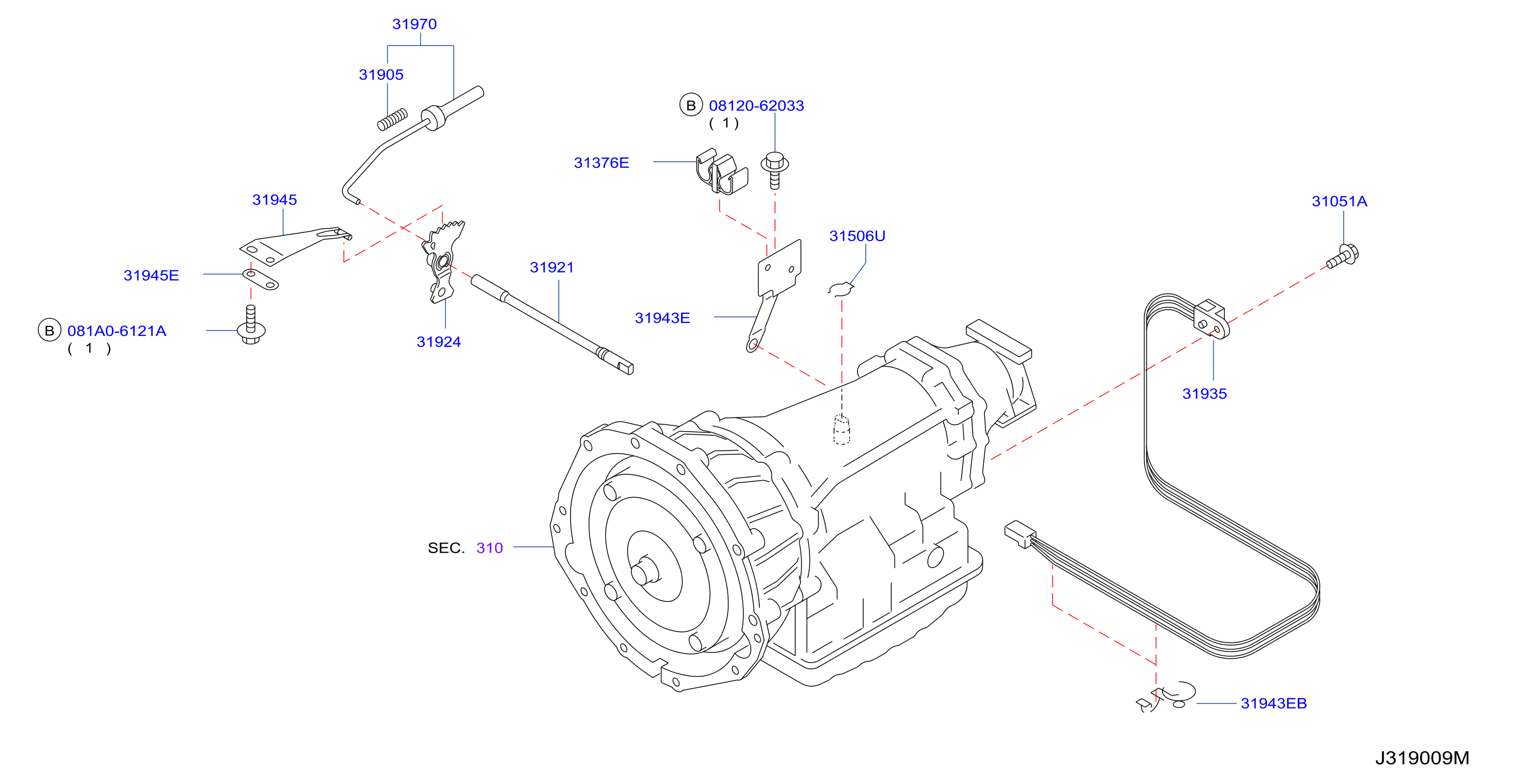
The 2017 Nissan Armada, like many modern vehicles, relies heavily on sensors to ensure smooth and efficient operation. One crucial component is the output speed sensor (OSS). This sensor plays a vital role in the transmission's function, and understanding its location, maintenance, and troubleshooting is essential for both car owners and mechanics.
Understanding the Output Speed Sensor
The output speed sensor measures the rotational speed of the transmission's output shaft. This information is relayed to the vehicle's computer (ECU/PCM), which uses it to determine vehicle speed, control shift points, and manage other functions like cruise control and traction control. A malfunctioning OSS can lead to a variety of driveability problems.
Location on the 2017 Nissan Armada
The output speed sensor on the 2017 Nissan Armada is typically located on the transmission housing, near the rear of the transmission where the driveshaft connects. It's usually secured with a single bolt or screw. Due to the Armada's size and 4x4 capability, accessing the sensor might require a bit more maneuvering. You'll likely need to get under the vehicle. It is always recommended to use jack stands to secure the vehicle before performing any work underneath it.
Important Note: Consult your vehicle's repair manual for the precise location as it can vary slightly depending on the specific transmission type installed.
Before starting any work, disconnect the negative terminal of the battery. This prevents accidental electrical shorts and ensures your safety.
Common Symptoms of a Failing Output Speed Sensor
A failing output speed sensor can manifest in several ways. Recognizing these symptoms early can help prevent more significant damage to the transmission and other vehicle systems.
- Erratic Shifting: The transmission may shift inappropriately, either too early or too late, or shift roughly. This is because the ECU is receiving incorrect speed data, leading to incorrect shift calculations.
- Check Engine Light (CEL): A faulty OSS will often trigger the check engine light. Diagnostic trouble codes (DTCs) such as P0720 (Output Speed Sensor Circuit Malfunction), P0721 (Output Speed Sensor Range/Performance), P0722 (Output Speed Sensor No Signal), and P0723 (Output Speed Sensor Intermittent) are commonly associated with OSS issues.
- Speedometer Problems: The speedometer might fluctuate erratically or stop working altogether. This is a direct consequence of the ECU not receiving accurate speed information from the OSS.
- Cruise Control Issues: Cruise control may fail to engage or disengage unexpectedly. Since cruise control relies on accurate speed data, a faulty OSS will disrupt its functionality.
- Traction Control/ABS Problems: In some cases, a faulty OSS can interfere with the operation of the traction control and anti-lock braking systems (ABS), as these systems also use speed data for their calculations.
- Stalling: In rare cases, a failing OSS can cause the engine to stall, particularly at low speeds. This is often due to the ECU misinterpreting the vehicle's speed and adjusting the engine parameters incorrectly.
- Limp Mode: The vehicle might enter "limp mode," restricting engine power and speed to protect the transmission from further damage.
Troubleshooting the Output Speed Sensor
If you suspect a problem with your 2017 Nissan Armada's output speed sensor, follow these troubleshooting steps:
- Scan for Diagnostic Trouble Codes (DTCs): Use an OBD-II scanner to retrieve any stored DTCs. This will help pinpoint the source of the problem. Note down all codes present.
- Visual Inspection: Carefully inspect the OSS and its wiring harness for any signs of damage, such as frayed wires, corrosion, or loose connections. Pay close attention to the connector itself.
- Check the Wiring: Use a multimeter to check the wiring for continuity and shorts to ground. Refer to the vehicle's wiring diagram for the correct pinout and expected values. Damage to the wiring harness is a common cause of OSS issues, especially in areas exposed to the elements.
- Test the Sensor: Use a multimeter to test the OSS's resistance or voltage output. Refer to the vehicle's repair manual for the correct testing procedure and specifications. This usually involves spinning the transmission output shaft and observing the sensor's output signal.
- Check the Tone Ring: The OSS reads the speed from a toothed "tone ring" or reluctor ring on the output shaft. Inspect this ring for damage, debris, or corrosion. A damaged tone ring will prevent the OSS from reading the speed accurately.
Real-World Issues and Solutions
Here are some real-world scenarios and solutions related to the output speed sensor:
- Scenario 1: Code P0720, No Visible Damage: You scan your Armada and find code P0720 but the sensor and wiring appear fine. Solution: The sensor might be internally faulty. Replace the sensor with a new one. Also, double-check the connector pins for corrosion or looseness, even if they look okay at first glance. Clean them with electrical contact cleaner.
- Scenario 2: Intermittent Speedometer Fluctuations: The speedometer needle jumps around erratically, especially at highway speeds. Solution: This could be caused by a loose connection or a damaged tone ring. Inspect the wiring harness thoroughly, and check the tone ring for any signs of damage or debris. If the tone ring is damaged, it will need to be replaced, which often involves removing the transmission.
- Scenario 3: Vehicle Stuck in Limp Mode After Off-Roading: After some off-road driving, the vehicle enters limp mode and throws OSS-related codes. Solution: Off-roading can expose the sensor and wiring to mud, water, and debris. Carefully clean the sensor and connector, and inspect the wiring for damage. Water intrusion can cause corrosion and short circuits. Consider applying dielectric grease to the connector to prevent future moisture problems.
- Scenario 4: Transmission Slipping: The vehicle is experiencing transmission slipping in 2nd and 3rd gear. A scan reveals a P0721 code. Solution: The slippage might be related to incorrect sensor readings impacting shift points. In cases like these, simply replacing the output sensor might not be enough. A complete transmission fluid flush and filter change is recommended, alongside the sensor replacement. If the issue persists after this, further transmission diagnostics are required.
Replacing the Output Speed Sensor
If the output speed sensor is faulty, replacement is usually straightforward.
- Disconnect the Battery: As mentioned before, disconnect the negative terminal of the battery.
- Locate the Sensor: Find the output speed sensor on the transmission housing.
- Disconnect the Electrical Connector: Carefully disconnect the electrical connector from the sensor.
- Remove the Sensor: Remove the bolt or screw securing the sensor and gently pull the sensor out of the transmission housing.
- Install the New Sensor: Install the new sensor, ensuring it is properly seated in the housing. Tighten the retaining bolt or screw to the specified torque.
- Reconnect the Electrical Connector: Reconnect the electrical connector to the sensor.
- Reconnect the Battery: Reconnect the negative terminal of the battery.
- Clear DTCs: Use an OBD-II scanner to clear any stored DTCs.
- Test Drive: Take the vehicle for a test drive to ensure the problem is resolved and the transmission is shifting correctly.
Caution: When removing the sensor, be prepared for a small amount of transmission fluid to leak out. Have a rag ready to catch any spills.
For accurate repairs, always use OEM or high-quality replacement parts.
Preventative Maintenance for Long-Term Reliability
While output speed sensors are relatively durable, preventative maintenance can help extend their lifespan and prevent problems.
- Regular Transmission Fluid Changes: Maintaining clean transmission fluid is crucial for the health of the entire transmission, including the OSS. Follow the manufacturer's recommended service intervals for transmission fluid changes. Dirty or contaminated fluid can damage the sensor and other transmission components.
- Inspect Wiring Regularly: Periodically inspect the OSS wiring and connectors for signs of damage, corrosion, or looseness. Address any issues promptly.
- Avoid Harsh Driving: Aggressive acceleration and hard braking can put extra stress on the transmission and its components, including the OSS.
- Address Check Engine Lights Immediately: Don't ignore a check engine light. Have the vehicle scanned for DTCs and address any issues promptly. Ignoring a seemingly minor problem can lead to more significant and costly repairs down the road.
- Protect Wiring During Repairs: When performing any other repairs on the vehicle, be careful not to damage the OSS wiring or connector.
By understanding the function, location, and troubleshooting of the output speed sensor on your 2017 Nissan Armada, you can proactively address potential issues and keep your vehicle running smoothly for years to come. Regular maintenance and prompt attention to warning signs will help ensure the longevity and reliability of your Armada's transmission system.