
Ford Steering Column Control Module
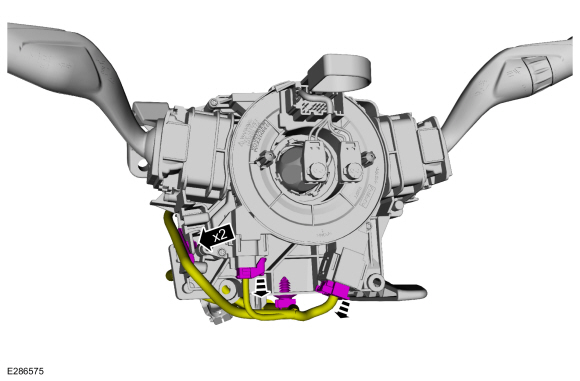
The Steering Column Control Module (SCCM) in Ford vehicles is a critical component, responsible for managing various functions beyond just steering. It acts as a central hub, controlling everything from your turn signals and wipers to cruise control and sometimes even the security system. Because of its multifaceted role, SCCM issues can manifest in a variety of ways, making diagnosis challenging. This article provides practical guidance for both car owners and mechanics on SCCM maintenance, troubleshooting, and resolution of common real-world problems.
Understanding the Ford SCCM
The SCCM, often located within the steering column itself, is essentially a small computer. It receives input from various sensors and switches and, based on that input, controls different electrical systems. A malfunctioning SCCM can disrupt many vehicle functions, leading to frustration and potentially unsafe driving conditions.
Common Symptoms of SCCM Failure
Identifying the signs of a failing SCCM is the first step in addressing the problem. Here are some common symptoms you might encounter:
- Inoperative Turn Signals: This is perhaps the most frequently reported issue. The turn signals might not work at all, work intermittently, or only function on one side. Think of a Ford Focus where the left turn signal suddenly stops working, but the right one is fine.
- Wiper Malfunctions: The wipers might not turn on, operate erratically (too fast or too slow), or get stuck in a particular position. A Ford F-150 owner might experience wipers that turn on even when the switch is off.
- Cruise Control Issues: The cruise control system might not engage, disengage unexpectedly, or display error messages. This is quite common in Ford Escapes.
- Horn Problems: The horn may not work or only work sporadically.
- Airbag Warning Light: In some cases, an SCCM issue can trigger the airbag warning light, as the module may be involved in the airbag system's diagnostics.
- Radio/Audio Control Problems: If your steering wheel-mounted audio controls aren't working, the SCCM could be the culprit.
- Keyless Entry/Remote Start Problems: The SCCM can interfere with the functionality of your key fob, making it difficult to lock/unlock the doors or start the car remotely.
- Difficulty Starting the Vehicle: In rare cases, a severely malfunctioning SCCM can prevent the vehicle from starting. This is often linked to immobilizer functionality controlled by the SCCM.
Troubleshooting the SCCM: A Step-by-Step Approach
Before assuming the SCCM is faulty, it's crucial to rule out other potential causes. Here's a systematic troubleshooting process:
1. Preliminary Checks:
Start with the basics:
- Check Fuses: Examine the fuses related to the affected systems (turn signals, wipers, etc.). A blown fuse is a common and easily fixable issue. Refer to your owner's manual for fuse locations.
- Inspect Wiring and Connectors: Look for any obvious signs of damage to the wiring harness and connectors leading to the SCCM. Corrosion, frayed wires, or loose connections can cause problems.
- Scan for Diagnostic Trouble Codes (DTCs): Use an OBD-II scanner to check for any stored trouble codes. These codes can provide valuable clues about the nature and location of the problem. Codes related to the steering angle sensor, communication bus errors (CAN bus), or specific switch failures within the SCCM are common indicators.
Note: A generic OBD-II scanner might not always be able to read all SCCM-related codes. A more advanced scan tool capable of accessing Ford-specific modules is often necessary.
2. Component Testing:
If the preliminary checks don't reveal the issue, you'll need to test individual components:
- Multimeter Testing: Use a multimeter to check the voltage and continuity of circuits related to the affected systems. Refer to the vehicle's wiring diagram for accurate test points. For example, checking the voltage at the turn signal switch terminals can help determine if the switch itself is functioning correctly.
- Switch Testing: Test the various switches on the steering column (turn signal switch, wiper switch, cruise control switch) using a multimeter or specialized switch tester. Ensure they are sending the correct signals to the SCCM.
- Steering Angle Sensor Testing: If you suspect a steering angle sensor issue (often indicated by DTCs), you may need to use a scan tool to monitor the sensor's output while turning the steering wheel. Erratic or illogical readings indicate a faulty sensor.
3. SCCM Specific Diagnostics:
This is where a professional scan tool becomes essential:
- SCCM Module Scan: Connect a diagnostic scan tool that can access the SCCM module. Read and interpret any stored DTCs.
- Live Data Monitoring: Monitor live data streams from the SCCM to observe the inputs and outputs of various sensors and switches. This can help pinpoint specific problems. For instance, you can monitor the status of the turn signal switch input to the SCCM to see if the module is receiving the signal when the switch is activated.
- Actuator Testing: Use the scan tool to activate various outputs of the SCCM, such as the turn signals or wipers. This can help determine if the module is capable of controlling these functions.
Common Causes and Solutions
Based on the symptoms and troubleshooting steps, here are some common causes of SCCM problems and their respective solutions:
- Faulty Switches: The switches on the steering column are mechanical components that can wear out over time. Replace the faulty switch (turn signal switch, wiper switch, etc.). Example: A worn-out turn signal switch in a Ford Explorer causing intermittent turn signal failures.
- Clock Spring Issues: The clock spring is a coiled ribbon cable that allows the steering wheel to rotate while maintaining electrical connections to the airbag, horn, and other steering wheel-mounted components. A broken or damaged clock spring can disrupt these connections, leading to SCCM-related issues.
Solution: Replace the clock spring. Important Safety Note: Exercise extreme caution when working with the clock spring, as it is directly related to the airbag system. Disconnect the battery and follow proper safety procedures to prevent accidental airbag deployment.
- Corrosion: Moisture and corrosion can damage the electrical connectors and wiring leading to the SCCM. Clean the connectors with an electrical contact cleaner and repair any damaged wiring.
- SCCM Failure: In some cases, the SCCM itself may be faulty due to internal component failure. This is often indicated by multiple unrelated symptoms and the presence of DTCs that point to SCCM-related issues.
Solution: Replace the SCCM. This typically requires programming the new module to the vehicle's VIN (Vehicle Identification Number) using a specialized scan tool.
- Software Glitches: Occasionally, software glitches within the SCCM can cause problems. A reflash of the SCCM software with the latest version may resolve the issue. This requires a scan tool with programming capabilities.
Real-World Examples
- Ford Focus (2012): Intermittent turn signal failure, traced to a faulty turn signal switch within the SCCM. Solution: Replaced the turn signal switch.
- Ford F-150 (2018): Wipers turning on randomly, traced to a corroded connector at the SCCM. Solution: Cleaned the connector and applied dielectric grease.
- Ford Escape (2015): Cruise control not engaging, traced to a faulty SCCM requiring replacement and reprogramming.
- Ford Explorer (2016): Airbag warning light on, accompanied by steering angle sensor DTC. Solution: Replaced the clock spring and recalibrated the steering angle sensor.
Maintenance Tips for a Healthy SCCM
While the SCCM is not a regularly serviced component, following these tips can help prevent problems:
- Avoid Excessive Steering Wheel Movement at Full Lock: This can put stress on the clock spring and other components within the SCCM.
- Keep the Steering Column Area Clean and Dry: Moisture and debris can accelerate corrosion and damage electrical connections.
- Address Minor Electrical Issues Promptly: Don't ignore intermittent electrical problems, as they can sometimes be early warning signs of SCCM issues.
- Regular Vehicle Scans: Periodic vehicle scans using an OBD-II scanner can help detect potential problems early, even if there are no obvious symptoms.
Conclusion
The Ford SCCM is a complex component that plays a vital role in your vehicle's operation. By understanding its function, recognizing the common symptoms of failure, and following a systematic troubleshooting approach, you can effectively diagnose and resolve SCCM-related issues. Remember to prioritize safety when working with electrical components, especially those related to the airbag system. And when in doubt, consult a qualified mechanic for professional assistance. Regular maintenance and prompt attention to electrical problems will help keep your car in top condition and ensure a safe and enjoyable driving experience.