
How Do You Know If Traction Control Is On
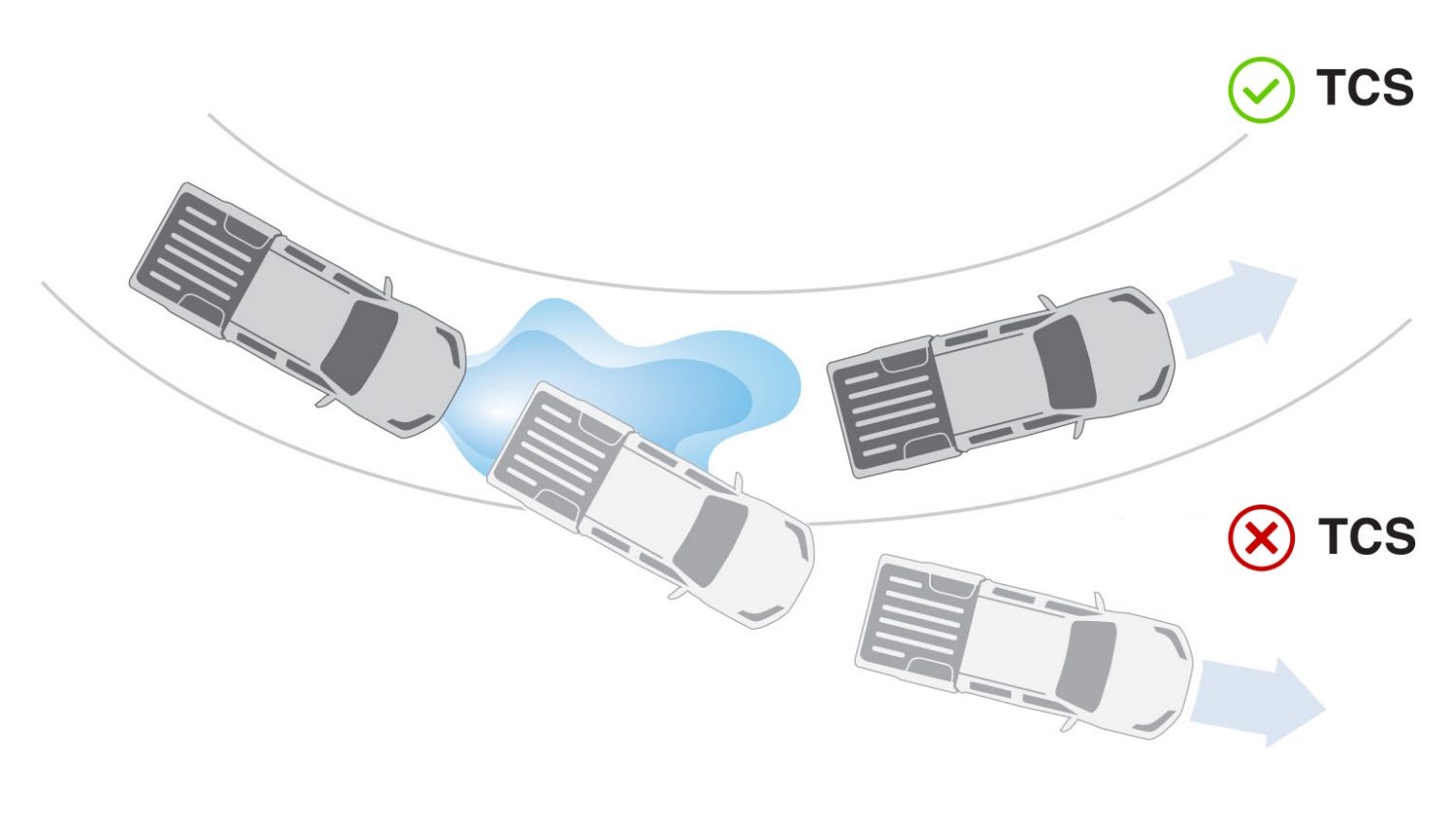
Knowing whether your car's Traction Control System (TCS) is active can be crucial for both everyday driving and performance situations. Unlike Anti-lock Braking Systems (ABS), which modulate brake pressure to prevent wheel lockup under heavy braking, TCS focuses on preventing wheel spin during acceleration. This article will delve into the telltale signs of TCS engagement, how to interpret dashboard indicators, and how to understand its operation based on different driving conditions.
Decoding Dashboard Indicators
The most straightforward way to determine if TCS is active is by observing your vehicle's instrument cluster. Modern vehicles are equipped with dedicated indicators that illuminate when the system is operating. These indicators vary slightly between manufacturers, but they generally fall into a few recognizable categories:
The "TCS" Light:
Typically, this is a dedicated light with the letters "TCS" illuminated. When this light is steadily lit, it generally indicates that the TCS system is disabled, either manually by the driver or due to a system malfunction. A flashing "TCS" light, however, signifies that the system is actively intervening to prevent wheel spin.
The "Slip" Indicator:
This icon usually depicts a car with squiggly lines trailing behind the rear tires, visually representing a loss of traction. Similar to the "TCS" light, a steadily lit "Slip" indicator usually means the system is disabled or experiencing a fault. A flashing "Slip" indicator means the system is actively engaged and working to regain traction. Some manufacturers use this indicator even when TCS is disabled to show that a loss of traction has occurred, so consult your owner's manual to confirm the system’s operating mode.
The "ESC" or "Stability Control" Light:
Electronic Stability Control (ESC) is a more comprehensive system that incorporates TCS along with other features like yaw control (preventing the car from spinning out). In some vehicles, the ESC light will illuminate to indicate TCS activity, especially if the TCS function is integrated within the ESC system. Again, a steady light generally signifies that ESC, and therefore TCS, is disabled or malfunctioning. A flashing light indicates active intervention.
Important Note: Always refer to your vehicle's owner's manual for the specific meaning of each indicator light. Different manufacturers may use slightly different symbols or illumination patterns.
Recognizing TCS Intervention While Driving
Beyond dashboard indicators, experienced drivers can often feel or hear the TCS system working. The sensations vary depending on the vehicle and the severity of the wheel spin, but common symptoms include:
- Reduced Engine Power: TCS often reduces engine power to limit torque applied to the spinning wheel(s). You might feel a momentary hesitation or a decrease in acceleration when the system kicks in.
- Brake Application: TCS can selectively apply braking force to the spinning wheel(s). You might feel a subtle pulsation or grabbing sensation in the brake pedal. This is often accompanied by a faint whirring or grinding noise from the brakes.
- A "Stuttering" Sensation: If the system is aggressively intervening, you may feel a brief, rhythmic "stuttering" or jerking as the TCS rapidly modulates engine power and/or brake pressure.
- Changes in Steering Feel: In some vehicles with advanced stability control systems, the steering wheel might provide slight corrective inputs to help maintain directional stability. This is usually subtle but can be noticeable during severe traction loss.
These sensations are typically more pronounced on slippery surfaces like snow, ice, or gravel. On dry pavement, TCS intervention might be less noticeable but can still occur during aggressive acceleration.
Understanding the Underlying Technology
TCS relies on a network of sensors and actuators to detect and respond to wheel spin. The core components include:
- Wheel Speed Sensors: These sensors, typically located at each wheel hub, continuously monitor the rotational speed of each wheel. The data is transmitted to the ABS/ESC control module.
- ABS/ESC Control Module: This electronic control unit (ECU) processes the wheel speed data. If it detects that one or more wheels are spinning significantly faster than others (indicating a loss of traction), it initiates TCS intervention.
- Hydraulic Control Unit (HCU): This unit controls the brake pressure to each individual wheel. TCS uses the HCU to selectively apply braking force to the spinning wheel(s).
- Engine Control Unit (ECU): The ECU is responsible for managing engine power output. TCS communicates with the ECU to reduce engine torque when wheel spin is detected.
The system works by comparing the rotational speed of each wheel. When a wheel starts to spin excessively, the TCS will first attempt to reduce engine power. If that is insufficient, it will then apply braking force to the spinning wheel. By slowing down the spinning wheel, the TCS helps to transfer power to the wheels with more grip, allowing the vehicle to regain traction and accelerate smoothly.
Troubleshooting TCS Issues
If the TCS light remains illuminated steadily, it indicates a problem within the system. Common causes include:
- Faulty Wheel Speed Sensor: A damaged or malfunctioning wheel speed sensor can provide inaccurate data, causing the TCS to disable itself.
- ABS/ESC Control Module Failure: A failure in the ABS/ESC control module can prevent the TCS from functioning properly.
- Hydraulic Control Unit Malfunction: Issues with the HCU can impair the TCS's ability to modulate brake pressure.
- Wiring Problems: Damaged or corroded wiring can disrupt communication between the sensors, control modules, and actuators.
Diagnostic Tip: A diagnostic scan tool can retrieve trouble codes stored in the ABS/ESC control module. These codes can provide valuable information about the specific nature and location of the fault. Consult a qualified mechanic for diagnosis and repair if you are not comfortable working on brake or electronic systems.
Disabling TCS
Most vehicles allow you to disable TCS, typically via a button on the dashboard or center console. There are specific situations where disabling TCS can be beneficial:
- Getting Unstuck: In deep snow or mud, allowing the wheels to spin slightly can sometimes help you gain momentum and free the vehicle. TCS can prevent this by cutting power to the wheels.
- Certain Driving Conditions: Some experienced drivers prefer to disable TCS on race tracks or during off-road driving to have more direct control over the vehicle's handling.
However, remember that disabling TCS reduces the vehicle's stability and traction. Use caution and only disable it when you have a clear understanding of the potential consequences.
By understanding the dashboard indicators, recognizing the sensations of TCS intervention, and knowing the underlying technology, you can better understand your vehicle's capabilities and drive more safely and confidently in a variety of conditions. Always consult your owner's manual for specific information about your vehicle's TCS system.