
How To Find Paint Code Using Vin Number
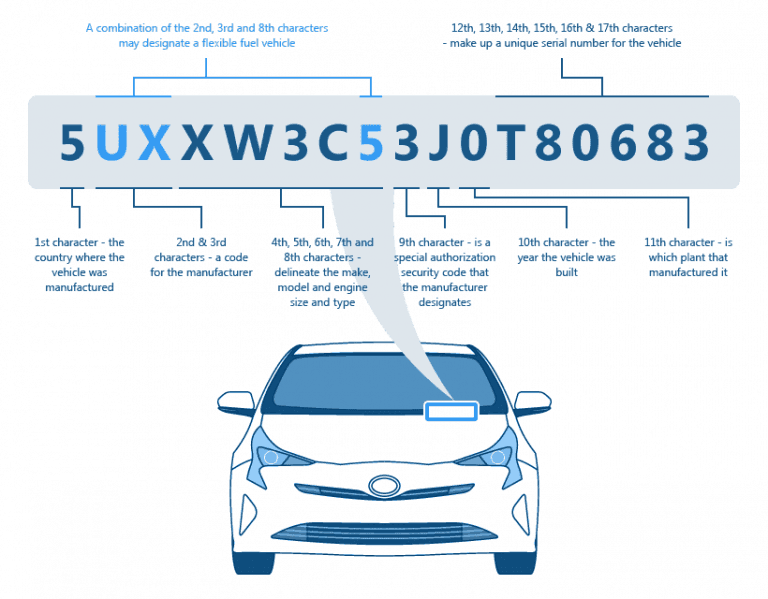
Finding the exact paint color for your car is crucial for touch-ups, repairs, or even a full respray. While you might think your car is "just red," the automotive world is full of nuanced shades with specific codes. Fortunately, your car's Vehicle Identification Number (VIN) can often be the key to unlocking this information. This article will guide you through the process of finding your paint code using your VIN, even if it's not always a straightforward process.
Understanding the VIN and Its Role
The VIN is a unique 17-character alphanumeric code assigned to every vehicle. Think of it as your car's fingerprint. It contains information about the manufacturer, model, year, engine, and assembly plant. While the paint code isn't directly encoded within the VIN itself, it can often be indirectly linked through manufacturer databases and online VIN decoders.
It's important to understand that simply decoding the VIN won't always reveal the paint code. The VIN acts as a key to access manufacturer-specific data where paint information is stored. This is why using specialized resources or contacting the manufacturer directly is often necessary.
Methods to Find Your Paint Code Using the VIN
1. Using Online VIN Decoders
Many websites offer VIN decoding services. Some are free, while others require a subscription or a small fee. These decoders take your VIN and attempt to retrieve information from various databases. Some decoders are more comprehensive than others. Look for decoders that specifically mention providing paint code information.
Example: Imagine you own a 2018 Honda Civic. You find a free VIN decoder online and enter your VIN. If the decoder's database includes paint code information for Hondas, it might display something like: "Paint Code: R569P - Alabaster Silver Metallic."
Important Considerations for VIN Decoders:
- Accuracy: Not all VIN decoders are created equal. Some might have outdated information or incomplete databases. Verify the information provided with other sources.
- Reliability: Be wary of websites that ask for excessive personal information or seem untrustworthy. Stick to reputable and well-reviewed decoders.
- Completeness: Even the best VIN decoders might not always provide the paint code. It depends on the vehicle manufacturer and the decoder's data sources.
2. Contacting the Vehicle Manufacturer or Dealership
This is often the most reliable method. Your local dealership has access to the manufacturer's database and can usually retrieve the paint code using your VIN. You can either visit the dealership in person or contact their parts department by phone or email.
Example: Let's say you own a 2015 Ford Mustang. You call your local Ford dealership, provide them with your VIN, and explain that you need the paint code. The parts department can look up your vehicle in their system and tell you something like, "Your Mustang is painted RR - Race Red."
Tips for contacting the manufacturer:
- Have your VIN ready: This is the most important piece of information.
- Be prepared to provide proof of ownership: The dealership may ask for your driver's license and vehicle registration to verify that you own the car.
- Be patient: It may take a few minutes for the parts department to locate the information.
3. Checking Physical Locations on the Vehicle
While the paint code isn't in the VIN, many manufacturers also place a sticker or plate on the vehicle itself that contains the paint code. This is typically located in one of the following places:
- Driver's side door jamb: This is a common location. Look for a sticker or plate on the door frame when the driver's side door is open.
- Under the hood: Check the radiator support, the firewall, or the underside of the hood itself.
- Glove box: Some manufacturers place the sticker inside the glove box.
- Spare tire well: In rare cases, the sticker might be located in the spare tire compartment.
Example: You own a 2020 Toyota Camry. You open the driver's side door and find a sticker on the door jamb. The sticker contains various information, including "Color: 070." In this case, "070" is likely your paint code (Arctic Frost Pearl).
Decoding the Sticker: The sticker may contain more information than just the paint code. You might see codes for the interior trim, engine, and transmission. The paint code is usually labeled as "Color," "Paint Code," or something similar. Refer to your owner's manual for a key to understanding the codes on the sticker.
Understanding Paint Code Formats
Paint codes vary in format depending on the manufacturer. There's no universal standard. Some are alphanumeric, others are numeric, and some even include a mix of letters, numbers, and symbols. Here are a few examples:
- General Motors (GM): GM paint codes often consist of a two-digit number followed by a letter (e.g., 41U for Black). They may also use WA codes (e.g., WA8555).
- Ford: Ford uses a two-letter code (e.g., RR for Race Red, UX for Ingot Silver).
- Toyota: Toyota typically uses a three-digit numeric code (e.g., 070 for Arctic Frost Pearl, 202 for Black).
- Honda: Honda paint codes often include a combination of letters and numbers, sometimes followed by "P" for pearl or "M" for metallic (e.g., NH731P for Crystal Black Pearl).
- BMW: BMW paint codes are often three-digit numeric codes (e.g., 475 for Black Sapphire Metallic).
Important Note: When ordering paint, be sure to specify the full paint code and the paint name (e.g., "Ford RR - Race Red" or "Toyota 070 - Arctic Frost Pearl"). This will help ensure that you receive the correct color.
Challenges and Limitations
While using the VIN to find the paint code is often successful, there are some challenges and limitations to be aware of:
- Repainted Vehicles: If your car has been repainted, the original paint code may no longer be relevant. The VIN will only provide the original factory paint code.
- Custom Paint Jobs: If your car has a custom paint job, the VIN will not be helpful. You'll need to identify the paint color by other means, such as contacting the shop that performed the work.
- Limited Decoder Information: As mentioned earlier, not all VIN decoders have complete paint code information.
- Faded or Damaged Stickers: The sticker containing the paint code on the vehicle may be faded, damaged, or missing.
When All Else Fails: If you've tried all the methods above and still can't find the paint code, consider taking your car to an auto paint supply store. They can use a spectrophotometer to scan the paint and match it to a corresponding formula. This is a more accurate option than relying on visual comparisons or guesswork.
Practical Takeaways
Finding your car's paint code using the VIN is a valuable skill for any car enthusiast or owner. Here are some practical takeaways to help you apply this knowledge:
- Start with the VIN: Always begin your search with your car's VIN. It's the key to unlocking manufacturer-specific information.
- Try multiple VIN decoders: If one decoder doesn't provide the paint code, try another.
- Contact your dealership: Don't hesitate to contact your local dealership for assistance. They have access to the most accurate information.
- Check physical locations: Look for the paint code sticker on the door jamb, under the hood, or in the glove box.
- Verify the paint code and name: When ordering paint, always provide both the paint code and the paint name.
- Consider professional matching: If you're struggling to find the paint code, visit an auto paint supply store for professional color matching.
By following these steps, you'll be well-equipped to find the correct paint code for your vehicle and ensure a perfect match for your touch-ups and repairs.