
How To Program Hyundai Garage Door Opener
The modern automobile is a marvel of integrated technology, a rolling computer system seamlessly blending mechanical prowess with digital convenience. One often-overlooked feature in many Hyundai vehicles is the integrated garage door opener, a Homelink-compatible system that allows you to ditch the bulky remote and control your garage door directly from your car's interior. While seemingly simple in operation, the programming process involves a fascinating interplay of radio frequency (RF) communication and security protocols. Let's delve into the technical aspects of programming your Hyundai's garage door opener, examining the hows and whys behind each step.
Understanding the Homelink System
At its core, the Hyundai garage door opener leverages the Homelink system. Homelink is a widely adopted standard for integrating remote control functionality into vehicles. It's not just for garage doors; it can also control gates, lighting, and other compatible devices. The key element is a built-in transceiver that can learn and mimic the RF signals emitted by your existing remote control.
Before diving into the programming, it's crucial to understand the two primary types of garage door opener systems you might encounter: fixed code and rolling code. These systems differ significantly in their security mechanisms and, consequently, in the programming procedure.
Fixed Code Systems
Older garage door openers typically use fixed code technology. This means the RF signal transmitted by the remote remains the same every time the button is pressed. While simple to implement, this approach is vulnerable to replay attacks, where a malicious actor could record the signal and replay it later to gain unauthorized access.
Programming a fixed-code system is generally straightforward. The Homelink system simply needs to learn the fixed code by receiving a few transmission cycles from the original remote. However, due to the security risks, fixed-code systems are becoming increasingly rare.
Rolling Code Systems
Modern garage door openers overwhelmingly employ rolling code technology, also known as Security+. This system enhances security by changing the transmission code each time the remote is used. The garage door opener and the remote share a secret algorithm that generates a sequence of codes. After each use, the remote and the opener advance to the next code in the sequence. If the opener receives a valid code within a certain window of the expected sequence, it will activate. This prevents replay attacks since a recorded signal will be outdated and ineffective.
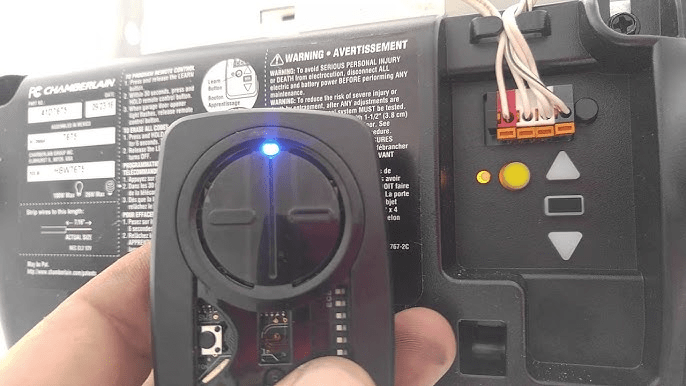
Programming a rolling code system is more complex. The Homelink system needs to not only learn a transmission signal from the remote but also interact with the garage door opener itself to synchronize the rolling code sequence. This requires a "learn" or "program" button on the garage door opener motor unit.
Step-by-Step Programming Guide
The programming procedure can vary slightly depending on your specific Hyundai model and the generation of the Homelink system installed. However, the general steps remain consistent:
- Clear Existing Programming: Before programming a new garage door opener, it's good practice to clear any existing codes stored in the Homelink system. This is typically done by pressing and holding the two outer Homelink buttons simultaneously for approximately 20-30 seconds. The indicator light should flash rapidly to confirm the memory has been cleared.
- Learning the Remote Signal:
Position your original garage door opener remote 1-3 inches away from the Homelink buttons in your Hyundai. Simultaneously press and hold both the desired Homelink button in your car and the button on your original remote. Watch the Homelink indicator light. Initially, it will likely blink slowly. Continue holding both buttons until the indicator light changes to a rapid, continuous flash. This indicates that the Homelink system has successfully learned the remote's signal.
Note: If the indicator light doesn't change after 20-30 seconds, try repositioning the remote or replacing its battery. Some newer remotes transmit a weaker signal and require closer proximity.
- Rolling Code Synchronization:
If your garage door opener uses rolling code technology, you'll need to synchronize the Homelink system with the opener itself. Locate the "learn" or "program" button on your garage door opener motor unit. This button is usually located on the back or side of the motor unit, often near the antenna wire. Press and release this button. You will typically have a limited time window (usually 30 seconds) to complete the synchronization.
Immediately after pressing the "learn" button, return to your Hyundai and press and hold the programmed Homelink button for 2-3 seconds, then release. Repeat this process (press and hold for 2-3 seconds, release) up to three times. The garage door should activate during one of these attempts.
Important: The location of the "learn" button can vary depending on the garage door opener manufacturer and model. Consult your garage door opener's owner's manual for specific instructions.
- Testing and Troubleshooting:
After completing the programming steps, test the Homelink button to ensure it properly opens and closes your garage door. If the door doesn't respond, repeat the programming process, paying close attention to the timing and proximity requirements. Common issues include a weak remote battery, incorrect button presses, or failure to press the "learn" button within the allotted time.
Troubleshooting Common Issues
Despite following the steps carefully, you might encounter difficulties. Here are some common troubleshooting tips:
- Weak Remote Battery: A weak battery in your original remote can hinder the learning process. Replace the battery with a fresh one and try again.
- Distance Issues: Ensure the remote is within the recommended distance (1-3 inches) of the Homelink buttons during the learning phase. Experiment with slightly different distances.
- Incorrect Button Pressing: Make sure you're pressing and holding both the Homelink button and the remote button simultaneously until the indicator light changes.
- Rolling Code Synchronization Failure: Ensure you press the "learn" button on the garage door opener motor unit and then immediately return to your vehicle to complete the synchronization process. The timing is crucial.
- Incompatible Garage Door Opener: While Homelink is widely compatible, some older or less common garage door opener models might not be supported. Check the Homelink website for compatibility information.
- Interference: Radio frequency interference from other devices can sometimes disrupt the programming process. Try moving your vehicle to a different location or turning off nearby electronic devices.
Security Considerations
While rolling code technology significantly enhances security, it's still important to be mindful of potential vulnerabilities. Avoid leaving your vehicle unlocked and unattended with the garage door opener programmed. Consider using the Homelink system's lockout feature (if available) when leaving your vehicle parked in public areas for extended periods.
Beyond Garage Doors: Expanding Homelink's Capabilities
As mentioned earlier, the Homelink system is not limited to garage doors. It can also control other compatible devices, such as gate openers, lighting systems, and even home automation devices. The programming process is generally similar, requiring you to learn the signal from the device's remote and potentially synchronize with the device's receiver. Consult the Homelink website or your device's owner's manual for specific instructions on how to integrate other devices with your Hyundai's Homelink system.
In conclusion, programming your Hyundai's garage door opener is a relatively straightforward process that allows you to conveniently control your garage door from the comfort of your car. By understanding the underlying technology and following the programming steps carefully, you can seamlessly integrate this feature into your daily routine and enjoy the added convenience and security it provides.