
How To Turn On 4x4 On Jeep Grand Cherokee
The Jeep Grand Cherokee, a vehicle synonymous with off-road prowess and all-weather capability, owes much of its versatility to its four-wheel-drive (4x4) system. However, unlike some older, more mechanically straightforward systems, engaging 4x4 in a Grand Cherokee isn't always a simple matter of pulling a lever. It involves understanding the nuances of the specific 4x4 system equipped in your vehicle, its electronic controls, and the conditions that necessitate its activation. This guide delves into the different 4x4 systems found in Grand Cherokees and provides a comprehensive walkthrough on how to engage them effectively.
Understanding the Grand Cherokee's 4x4 Systems
The Grand Cherokee has been offered with several different 4x4 systems over its production run, each with varying degrees of sophistication. Identifying which system your vehicle possesses is the first step to understanding its operation.
Quadra-Trac I
Quadra-Trac I is a full-time 4x4 system. This means it's always engaged and requires no driver intervention. It automatically distributes torque between the front and rear axles as needed. This system lacks a low-range gear and is primarily designed for enhanced traction on-road in inclement weather, like snow or rain, or on relatively mild off-road surfaces. While it doesn't require active engagement, understanding that it's always working is crucial for maintenance and driving considerations.
Quadra-Trac II
Quadra-Trac II is a more advanced system featuring a two-speed transfer case. This allows for selectable 4x4 modes, including a low-range gear. This system utilizes electronic sensors to monitor wheel slip and automatically redistribute torque. It also incorporates Brake Limited Slip Differential (BLSD) which uses the vehicle’s brakes to mimic the effect of a limited slip differential by applying braking force to a spinning wheel, thereby transferring torque to the wheel with more traction. To engage 4-Low in Quadra-Trac II, the vehicle typically needs to be in neutral (N) with the engine running. Then, you would rotate the selector knob to the 4-Low position. It is essential to check your owner's manual for the specific procedure for your model year.
Quadra-Drive II
Quadra-Drive II builds upon the Quadra-Trac II system by adding electronic limited-slip differentials (ELSDs) on both the front and rear axles. These ELSDs offer even greater torque transfer capabilities, enabling the vehicle to maintain traction in extremely challenging off-road conditions. Like Quadra-Trac II, engaging 4-Low in Quadra-Drive II requires the vehicle to be in neutral and then selecting the 4-Low mode. The ELSDs react proactively to wheel slip, transferring torque to the wheels with the most grip, even before wheel spin is detected.
Selec-Terrain Traction Management System
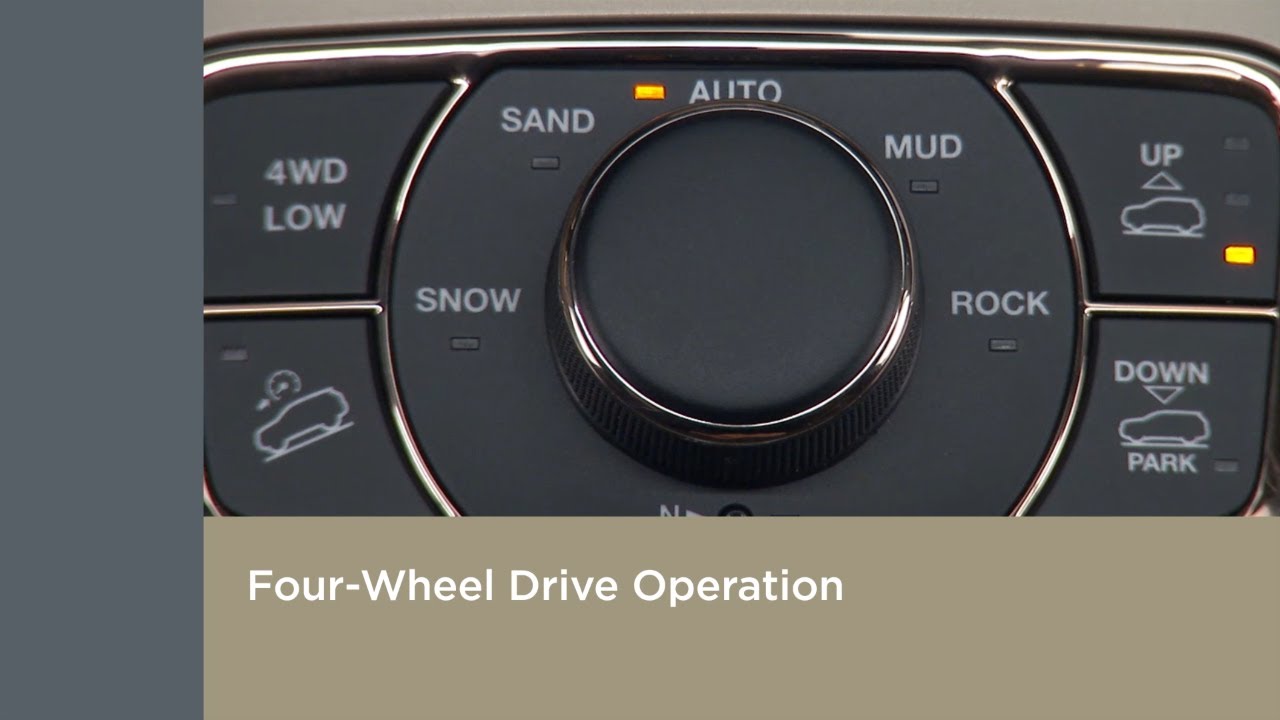
Many newer Grand Cherokees feature the Selec-Terrain system. This system allows the driver to select from various pre-programmed modes (e.g., Auto, Snow, Sand/Mud, Rock) that optimize the 4x4 system, throttle response, and electronic stability control settings for specific terrain conditions. When using Selec-Terrain, the system automatically engages or disengages 4x4 as needed based on the selected mode and sensor inputs. In some modes, the system may automatically engage 4-Low when conditions warrant it.
Engaging 4x4: A Step-by-Step Guide
The procedure for engaging 4x4 depends on the specific system. Here's a breakdown:
- Identify Your System: Consult your owner's manual to determine which 4x4 system your Grand Cherokee is equipped with.
- Quadra-Trac I: No action is required. The system is always engaged.
- Quadra-Trac II and Quadra-Drive II (4-High): Most systems will have an "Auto" setting, where the system automatically engages 4-High when needed. To manually engage 4-High, you may have a switch or knob on the center console. In most cases, you can shift into 4-High while driving at moderate speeds (check your owner's manual for specific speed limitations). Simply rotate the knob or press the switch to the 4-High position. You may see a light illuminate on the instrument cluster indicating that 4-High is engaged.
- Quadra-Trac II and Quadra-Drive II (4-Low): This requires a specific procedure:
- Stop the vehicle completely on a level surface.
- Shift the transmission into Neutral (N).
- With the engine running, rotate the selector knob or press the 4-Low button. You may need to hold the button for a few seconds.
- You should hear a clunking sound as the transfer case engages. This is normal.
- Wait for the 4-Low indicator light on the instrument cluster to illuminate.
- Shift the transmission into Drive (D) or Reverse (R) as needed.
- Selec-Terrain: Simply select the appropriate terrain mode using the selector dial. The system will automatically manage the 4x4 engagement. For instance, selecting "Snow" will typically engage 4-High, while "Rock" might engage 4-Low (depending on the specific system and model year).
Important Considerations and Tips
- Owner's Manual is Key: Always refer to your owner's manual for the specific instructions for your vehicle. Procedures can vary slightly between model years.
- Listen for Engagement: When engaging 4-Low, listen for the transfer case engaging. If you don't hear it, try shifting back to Neutral and repeating the process.
- Don't Force It: If the system seems to be resisting engagement, do not force it. Check the procedure in the owner's manual again, ensure the vehicle is on a level surface, and try again. Forcing the system could damage the transfer case.
- Speed Restrictions: 4-Low is intended for low-speed, high-torque situations. Avoid driving at high speeds in 4-Low, as it can damage the drivetrain.
- Turn on Flat Surfaces: Avoid making sharp turns on dry pavement while in 4-High or 4-Low. This can cause binding in the drivetrain and potentially damage the axles or transfer case. Drive straight for a short distance to relieve the pressure on the axles before turning on a high traction surface.
- Maintenance: Regular maintenance, including fluid changes for the transfer case and differentials, is crucial for maintaining the health and performance of your 4x4 system.
- Check Indicator Lights: Pay attention to the indicator lights on the instrument cluster. These lights will alert you to any issues with the 4x4 system.
Troubleshooting Common Issues
Sometimes, you may encounter issues with engaging or disengaging 4x4. Here are some common problems and potential solutions:
- Unable to Engage 4-Low:
Ensure the vehicle is completely stopped and on a level surface.
Verify that the transmission is in Neutral (N).
Check for any error codes or warning lights on the instrument cluster.
If still unable to engage, there might be an issue with the transfer case motor or the electronic controls. A diagnostic scan by a qualified technician may be necessary. - Binding or Clunking Noises:
This could be caused by driving on high-traction surfaces while in 4-High or 4-Low. Try driving straight for a short distance to relieve the pressure. If the noise persists, there may be an issue with the differentials or transfer case.
- 4x4 Indicator Light Flashing:
A flashing 4x4 indicator light typically indicates a problem with the 4x4 system. It could be a sensor issue, a motor problem, or a fault in the electronic controls. A diagnostic scan is needed to identify the cause.
Engaging 4x4 on a Jeep Grand Cherokee requires understanding the specific system equipped in your vehicle and following the correct procedure. By familiarizing yourself with the information in this guide and consulting your owner's manual, you can confidently and effectively utilize your Grand Cherokee's 4x4 capabilities to navigate a wide range of driving conditions. Remember, regular maintenance is essential for keeping your 4x4 system in top working order and ensuring reliable performance for years to come.