
Nissan Frontier Camshaft Position Sensor Location
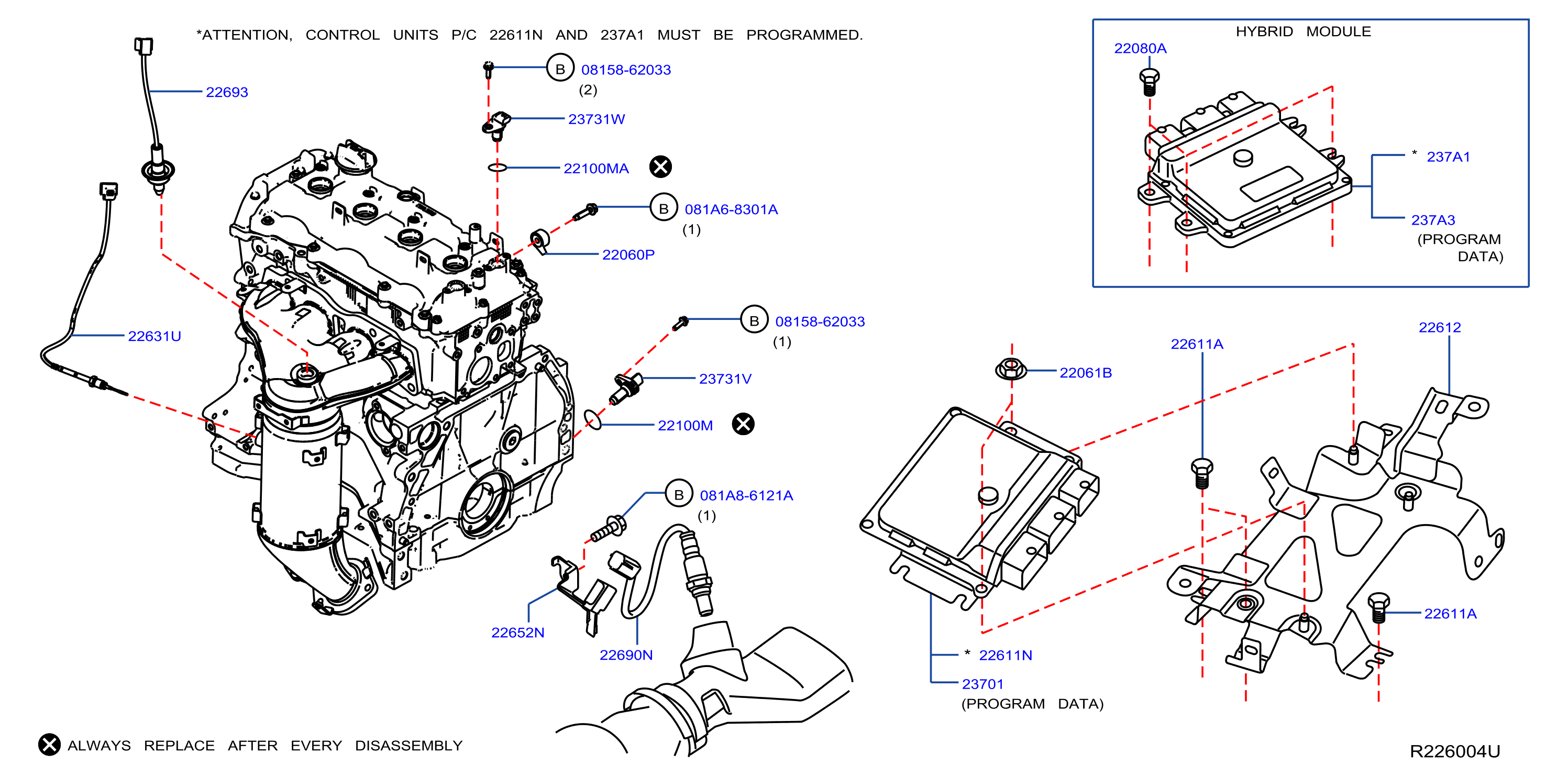
The Camshaft Position Sensor (CPS) is a critical component in your Nissan Frontier's engine management system. It plays a vital role in ensuring your truck runs smoothly and efficiently. Understanding its location and function is essential for any Nissan Frontier owner or enthusiast who wants to perform basic diagnostics or maintenance. Think of it as one of the brain's key messengers, constantly communicating vital timing information.
What Does the Camshaft Position Sensor Do?
In simple terms, the CPS tells the engine control unit (ECU), also known as the engine computer, the exact position of the camshaft. The camshaft, as you know, controls the opening and closing of the engine's valves. Knowing the camshaft's position is crucial for the ECU to correctly time fuel injection and ignition. This precise timing is what allows your engine to run smoothly, efficiently, and with optimal power.
Without a functioning CPS, the ECU wouldn't know when to fire the spark plugs or inject fuel into the cylinders. This can lead to a variety of problems, including:
- Engine stalling or misfiring: The engine might sputter or completely shut down.
- Rough idling: The engine might shake or vibrate excessively when at a standstill.
- Reduced fuel economy: The engine might be burning more fuel than usual.
- Difficulty starting: The engine might take longer to start or fail to start altogether.
- Check engine light: The dreaded "check engine" light will illuminate on your dashboard.
The CPS is usually an electromagnetic sensor. It works by detecting the passing of teeth or slots on a reluctor wheel attached to the camshaft. As the camshaft rotates, these teeth or slots create a signal that the sensor sends to the ECU. The ECU interprets this signal to determine the camshaft's position.
Locating the Camshaft Position Sensor on a Nissan Frontier
The location of the CPS can vary slightly depending on the year and engine of your Nissan Frontier. However, it is typically found near the front of the engine, close to the cylinder head. More specifically, you should look:
- On the cylinder head: Often, the CPS is mounted directly on the cylinder head, near the camshaft sprocket or pulley.
- Near the timing cover: The timing cover is the protective cover that houses the timing chain or belt. The CPS may be mounted on or near this cover, close to where the camshaft is located.
To help you visualize, consider these examples from other popular vehicles:
- Toyota Camry (similar 4-cylinder engines): The CPS is usually located on the cylinder head, near the valve cover.
- Ford F-150 (similar V6 engines): The CPS is often found near the front of the engine, close to the timing cover. There might be two CPS sensors, one for each camshaft.
Specific to the Nissan Frontier: The location is strongly correlated with the engine type. In the 4-cylinder Frontier models (KA24DE engine found in earlier models): look on the cylinder head, usually near the distributor (if equipped) or where the distributor would have been. For the V6 models (VG33E, VQ40DE engines), you'll generally find the CPS mounted on the cylinder head, close to the timing chain cover. On the VQ40DE, you'll often find two CPS sensors – one for each bank of cylinders.
Important Note: Always consult your vehicle's repair manual or a reliable online resource specific to your Nissan Frontier's year and engine to confirm the exact location of the CPS. Pictures or diagrams are invaluable in this process.
Identifying the Sensor
The CPS is typically a small, cylindrical or rectangular sensor with an electrical connector attached to it. The connector will usually have two or three wires. The sensor itself is often held in place by a single bolt or two.
Visually, it might resemble the Crankshaft Position Sensor (CKP). However, the CKP is usually located near the crankshaft pulley at the bottom of the engine block. Pay close attention to the wiring and connector to ensure you're identifying the correct sensor.
Troubleshooting a Suspected Camshaft Position Sensor Problem
If you suspect that your Nissan Frontier's CPS is failing, there are a few things you can do to diagnose the problem:
- Check the Check Engine Light: Use an OBD-II scanner to read the diagnostic trouble codes (DTCs) stored in the ECU. Common codes related to the CPS include P0340, P0341, P0342, P0343, P0344, P0345, P0346, P0347, P0348 and P0349. Note: these codes refer to specific circuits relating to the CPS.
- Inspect the Sensor: Visually inspect the CPS for any signs of damage, such as cracks, broken connectors, or corroded wiring.
- Check the Wiring: Inspect the wiring and connectors leading to the CPS for any signs of damage or corrosion. Use a multimeter to check for continuity and voltage in the wiring.
- Test the Sensor: Using a multimeter, you can test the sensor's resistance or voltage output. Refer to your vehicle's repair manual for the specific testing procedure and acceptable values. Some advanced scan tools can also monitor the CPS signal in real-time.
- Consider Professional Diagnosis: If you are not comfortable performing these tests yourself, it's best to take your vehicle to a qualified mechanic for diagnosis.
Replacing the Camshaft Position Sensor
Replacing the CPS is a relatively straightforward task that most DIY mechanics can handle. Here are the general steps involved:
- Disconnect the battery: This is crucial for safety to prevent electrical shocks and damage to the ECU.
- Locate the CPS: Refer to your vehicle's repair manual to confirm the exact location.
- Disconnect the electrical connector: Carefully disconnect the electrical connector from the CPS.
- Remove the mounting bolt(s): Remove the bolt(s) that hold the CPS in place.
- Remove the old sensor: Gently pull the old CPS out of its mounting hole.
- Install the new sensor: Install the new CPS, making sure it is properly seated.
- Install the mounting bolt(s): Tighten the mounting bolt(s) to the specified torque.
- Reconnect the electrical connector: Reconnect the electrical connector to the CPS.
- Reconnect the battery: Reconnect the battery.
- Clear the DTCs: Use an OBD-II scanner to clear any DTCs stored in the ECU.
- Test the vehicle: Start the engine and test the vehicle to ensure it is running properly.
Important Considerations:
- Use quality parts: Buy a replacement CPS from a reputable brand to ensure reliability and performance.
- Lubricate the O-ring: Apply a small amount of silicone grease to the O-ring on the new CPS to ensure a proper seal.
- Avoid over-tightening: Do not over-tighten the mounting bolts, as this can damage the sensor or the cylinder head.
Practical Takeaways
Understanding the location and function of your Nissan Frontier's CPS is invaluable for maintaining your truck. Here are some practical takeaways:
- Know your engine: Familiarize yourself with the specific engine in your Frontier and where the CPS is located.
- Invest in a repair manual: A repair manual provides detailed information on the CPS, including its location, testing procedures, and replacement instructions.
- Keep an eye on the check engine light: Pay attention to the check engine light and address any related DTCs promptly.
- Perform regular maintenance: Inspect the CPS and its wiring during routine maintenance to identify potential problems early on.
- Don't be afraid to DIY: Replacing the CPS is a relatively simple task that can save you money on labor costs.
By understanding the role and location of the Camshaft Position Sensor, you are better equipped to diagnose potential engine problems and maintain the performance of your Nissan Frontier. Keep this knowledge handy, and you'll be ready to tackle future automotive challenges with confidence.