
Nissan Rogue Blower Motor Location
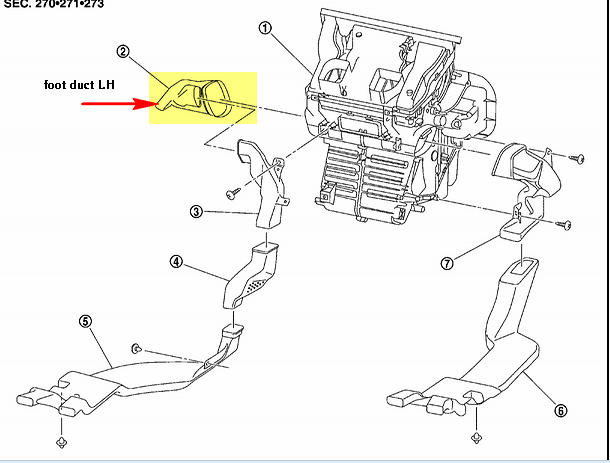
The blower motor in your Nissan Rogue is a vital component of the heating and air conditioning (HVAC) system. Its primary function is to circulate air through the vents, providing you with either warm or cool air as needed. When it fails, you'll notice immediate discomfort, especially in extreme weather conditions. This article will guide both car owners and mechanics through the process of locating, troubleshooting, and maintaining the blower motor in a Nissan Rogue, helping you identify problems early and implement effective solutions.
Locating the Blower Motor in a Nissan Rogue
The blower motor in most Nissan Rogue models (typically from 2008 onwards) is located on the passenger side of the vehicle, behind the glove compartment. While the exact procedure may vary slightly depending on the model year, the general steps remain consistent. Unlike some vehicles where it might be hidden deep within the dashboard, the Rogue's blower motor is relatively accessible, making DIY maintenance and repair feasible for many.
Here's a step-by-step guide to access it:
- Safety First: Disconnect the negative terminal of the battery to prevent any electrical shorts during the process.
- Clear the Area: Empty the glove compartment completely.
- Remove the Glove Compartment: Locate the retaining clips or screws that hold the glove compartment in place. Usually, there are clips on the sides that you need to gently push or squeeze to release. Some models might have screws at the bottom or top.
- Lower the Glove Compartment: Once the clips or screws are released, the glove compartment should swing down further than its normal opening position, revealing the blower motor assembly behind it.
- Locate the Blower Motor: The blower motor is typically a cylindrical component with a wiring harness connected to it. It's usually housed in a plastic casing.
Common Symptoms of a Failing Blower Motor
Recognizing the symptoms of a failing blower motor early can save you from more significant problems down the line. Here are some common indicators:
- No Airflow: This is the most obvious sign. If you turn on the HVAC system and no air comes out of the vents, the blower motor is a prime suspect.
- Weak Airflow: The air may be blowing, but it's significantly weaker than usual, even on the highest fan setting.
- Intermittent Operation: The blower motor works sometimes, but not others. This could be due to a loose connection or a failing motor.
- Unusual Noises: Grinding, squealing, or rattling sounds coming from the blower motor area indicate a problem. These noises can be caused by debris in the blower motor housing or worn-out bearings.
- Burning Smell: A burning smell emanating from the vents suggests that the blower motor is overheating, which can be a fire hazard. Immediately turn off the HVAC system and investigate.
Example: Imagine a Rogue owner noticing that their AC only blows weakly on setting 4, and nothing on settings 1-3. This is a strong indicator of a failing blower motor resistor, which controls the fan speed. Or, consider a mechanic diagnosing a Rogue with a loud rattling noise coming from behind the glove box only when the AC is on – this likely means debris has entered the blower motor fan housing.
Troubleshooting the Blower Motor
Once you've identified potential symptoms, it's time to troubleshoot the blower motor system. Here's a systematic approach:
1. Check the Blower Motor Fuse
The first step is to check the blower motor fuse. Locate the fuse box (usually under the dashboard or in the engine compartment) and find the fuse labeled "Blower Motor" or "HVAC." Use a fuse tester or a multimeter to check if the fuse is blown. If it is, replace it with a new fuse of the same amperage rating.
Problem: Blower motor fuse keeps blowing.
Solution: A continuously blowing fuse indicates a short circuit in the blower motor circuit. Check the wiring harness for any damaged or exposed wires. If the wiring looks good, the blower motor itself might be drawing too much current and needs replacement.
2. Inspect the Blower Motor Resistor
The blower motor resistor controls the fan speed. If the blower motor only works on one speed (usually the highest setting), the resistor is likely faulty. The resistor is typically located near the blower motor and is easy to identify. Replacing the resistor is a relatively simple and inexpensive fix.
Problem: Blower motor only works on high.
Solution: Replace the blower motor resistor. This is a common failure point and a relatively inexpensive repair.
3. Test the Blower Motor
To test the blower motor, you'll need a multimeter. Disconnect the wiring harness from the blower motor and use the multimeter to check for voltage at the connector when the HVAC system is turned on. If there's voltage, the problem lies with the blower motor itself. You can also directly power the blower motor by connecting it to a 12V power source (like the car battery). If it doesn't spin, it's definitely faulty.
Problem: No voltage at the blower motor connector.
Solution: Trace the wiring back to the fuse box and the HVAC control panel. Look for any breaks in the wiring or loose connections. The problem could also be a faulty HVAC control panel.
4. Check for Obstructions
Sometimes, debris like leaves, twigs, or rodent nests can get into the blower motor housing, obstructing the fan and causing it to malfunction. Remove the blower motor and inspect the housing for any obstructions. Clean it thoroughly before reinstalling the motor.
Problem: Blower motor makes a rattling or grinding noise.
Solution: Remove the blower motor and inspect the housing for debris. Clean the housing and the fan blades thoroughly. If the noise persists, the blower motor bearings might be worn out, and the motor needs replacement.
Replacing the Blower Motor
If the blower motor is indeed faulty, replacement is the next step. Here's a general guide:
- Disconnect the Battery: As always, disconnect the negative battery terminal.
- Access the Blower Motor: Follow the steps outlined earlier to access the blower motor behind the glove compartment.
- Disconnect the Wiring Harness: Carefully disconnect the wiring harness from the blower motor.
- Remove the Blower Motor: Most blower motors are held in place by screws or clips. Remove these fasteners and carefully pull the blower motor out of its housing.
- Install the New Blower Motor: Install the new blower motor in the reverse order of removal. Make sure the wiring harness is securely connected and the fasteners are properly tightened.
- Test the System: Reconnect the battery and turn on the HVAC system to test the new blower motor. Verify that it's working correctly on all fan speeds.
Example: A mechanic replacing a blower motor on a 2015 Rogue might find that the replacement motor comes with a slightly different connector. In this case, they might need to carefully splice the original connector onto the new motor's wiring (ensuring proper polarity!).
Real-World Issues and Solutions
Here are some real-world scenarios and their solutions:
- Problem: A Rogue owner notices a musty smell coming from the vents, even after replacing the blower motor.
- Problem: A mechanic finds that the blower motor wiring is melted or damaged.
- Problem: After replacing the blower motor, the airflow is still weak.
Solution: The evaporator core (located near the blower motor) might be harboring mold and bacteria. Clean the evaporator core with an HVAC cleaner designed for this purpose. Some products are spray-in foams that can be applied through the drain tube.
Solution: Replace the damaged wiring and the connector. Consider installing a higher-capacity wiring harness to prevent future overheating. A common cause of melted wiring is an old, struggling blower motor drawing excessive amperage.
Solution: Check the cabin air filter. A clogged cabin air filter can significantly restrict airflow. Replace the cabin air filter regularly (every 12,000-15,000 miles) to maintain optimal airflow. The location of the cabin air filter in a Rogue is typically behind the glove box or under the dash.
Preventative Maintenance for Optimal Performance
Preventative maintenance is key to extending the life of your Nissan Rogue's blower motor and HVAC system. Here are some tips:
- Replace the Cabin Air Filter Regularly: A clean cabin air filter ensures good airflow and prevents debris from entering the blower motor housing.
- Inspect the Blower Motor Area: Periodically check the blower motor area for any signs of debris or damage.
- Run the AC Regularly: Even in winter, run the AC for a few minutes each month to keep the system lubricated and prevent seals from drying out.
- Address Problems Promptly: Don't ignore any unusual noises or performance issues with the HVAC system. Addressing problems early can prevent more significant and costly repairs down the line.
By following these maintenance tips and troubleshooting guidelines, you can keep your Nissan Rogue's blower motor and HVAC system in top condition, ensuring comfortable driving experiences for years to come.