
Why Is There Blue Stuff On My Car Battery
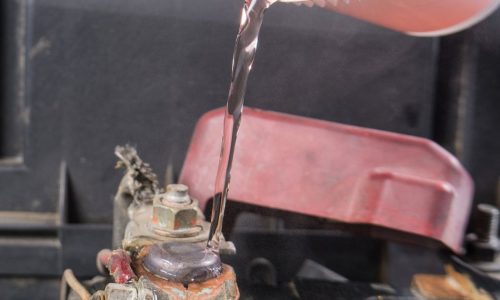
Seeing blue or greenish-white powder accumulating on your car battery terminals can be alarming, but it's a common issue. This powdery substance is corrosion, and it's important to address it promptly to prevent bigger problems. This article explains why it happens, how to fix it, and how to prevent it from returning.
What is That Blue Stuff?
That blue stuff is typically copper sulfate or lead sulfate. It forms when sulfuric acid from the battery's electrolyte reacts with the metal of the battery terminals, clamps, or surrounding metal components. While it's often blue or green, it can sometimes appear as a whitish powder. Regardless of the color, it's an indication of corrosion and needs attention.
Why Does Battery Corrosion Happen?
Several factors can contribute to battery corrosion:
- Electrolyte Leaks: Overcharging or damage to the battery can cause electrolyte to leak. This acid then reacts with the metal.
- Hydrogen Gas: Batteries release hydrogen gas as a byproduct of charging. This gas can react with moisture and the metal terminals, creating corrosion.
- Overcharging: Consistent overcharging, often due to a faulty voltage regulator, accelerates the corrosion process.
- Loose Connections: Loose battery terminals create resistance, generating heat that promotes corrosion.
- Age: Older batteries are more prone to leaks and corrosion due to general wear and tear.
- Environmental Factors: Exposure to humidity, road salt, and other contaminants can accelerate corrosion.
Common Symptoms of Battery Corrosion
The most obvious symptom is the visible blue or greenish-white powder on the battery terminals. However, other symptoms can indicate a corrosion problem:
- Slow Engine Cranking: Corrosion restricts the flow of electricity, making it harder for the starter motor to turn the engine.
- Dim Headlights: Insufficient power due to corrosion can cause headlights to appear dimmer than usual.
- Electrical Issues: Sporadic electrical problems, such as malfunctioning power windows or radio, can be linked to poor battery connections caused by corrosion.
- Difficulty Starting: In severe cases, corrosion can completely block the flow of electricity, preventing the car from starting.
- Check Engine Light: A corroded battery can sometimes trigger the check engine light, especially if it affects the charging system.
Troubleshooting and Solutions
Here’s a step-by-step guide to cleaning and preventing battery corrosion:
- Safety First: Wear safety glasses and gloves to protect your eyes and skin from battery acid.
- Disconnect the Battery: Disconnect the negative (-) terminal first, followed by the positive (+) terminal. Use a wrench to loosen the bolts, but be careful not to overtighten them.
- Prepare a Cleaning Solution: Mix baking soda and water to form a paste. This neutralizes the acid.
- Clean the Terminals and Clamps: Apply the baking soda paste to the corroded areas. Let it sit for a few minutes to dissolve the corrosion. Use a wire brush or battery terminal cleaner to scrub away the corrosion. You can buy a specialized terminal cleaning brush at any auto parts store.
- Rinse Thoroughly: Rinse the terminals and clamps with clean water to remove any remaining baking soda residue.
- Dry the Components: Dry the terminals and clamps with a clean cloth.
- Inspect the Cables: Check the battery cables for any signs of damage or corrosion. Replace them if necessary.
- Apply Terminal Protector: After cleaning and drying, apply a battery terminal protector or dielectric grease to the terminals and clamps. This will help prevent future corrosion. You can find these products at most auto parts stores.
- Reconnect the Battery: Reconnect the positive (+) terminal first, followed by the negative (-) terminal. Ensure the connections are tight but not overtightened.
- Start the Engine: Start the engine to ensure the battery is functioning correctly.
Example: On a 2015 Honda Civic, a common issue is corrosion forming around the positive terminal due to the battery's location near engine heat. Regular cleaning and application of terminal protectant are crucial to prevent starting problems. Similarly, on a 2018 Ford F-150, loose battery clamps can accelerate corrosion. Ensuring tight connections during maintenance is vital.
When to Replace the Battery
If the corrosion is severe and has damaged the battery terminals or cables, it might be time to replace the battery. Also, consider replacement if the battery is several years old or if it's consistently failing to hold a charge, even after cleaning the terminals.
Preventing Future Corrosion
Prevention is key to avoiding battery corrosion. Here are some tips:
- Regular Cleaning: Clean the battery terminals every few months, especially if you live in a humid climate or an area with road salt.
- Use Terminal Protector: Apply a battery terminal protector or dielectric grease after cleaning the terminals.
- Check for Leaks: Inspect the battery for leaks regularly. If you see any signs of electrolyte leakage, replace the battery immediately.
- Ensure Tight Connections: Make sure the battery terminals and clamps are securely tightened.
- Avoid Overcharging: If you frequently use a battery charger, be careful not to overcharge the battery. Use a charger with automatic shut-off.
- Proper Ventilation: Ensure the battery compartment has adequate ventilation to prevent the buildup of hydrogen gas.
Keeping Your Car in Top Condition
Addressing battery corrosion is just one aspect of maintaining your car's health. Regular maintenance, including oil changes, tire rotations, and fluid checks, is crucial for keeping your vehicle running smoothly and reliably. Don't neglect to check belts and hoses for wear and tear, and address any unusual noises or vibrations promptly. By staying proactive with maintenance, you can prevent costly repairs down the road and enjoy a safer, more dependable driving experience. Remember to consult your car's owner's manual for specific maintenance recommendations.