
2001 Nissan Frontier Brake Lights Stay On
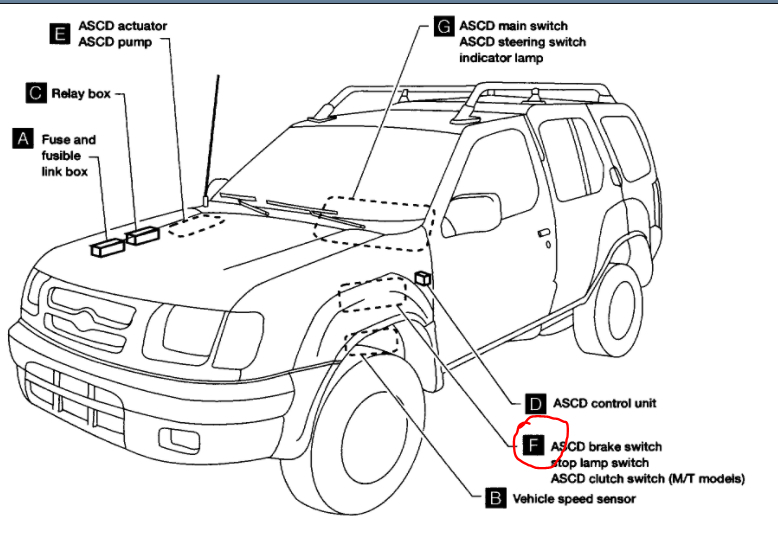
If you're experiencing the frustrating issue of your 2001 Nissan Frontier brake lights staying on, you're not alone. This is a relatively common problem that can stem from several causes. Leaving your brake lights illuminated can drain your battery, create a safety hazard for other drivers, and potentially get you pulled over by law enforcement. This article will guide you through the most likely culprits and offer troubleshooting steps to resolve the issue.
Understanding Why Brake Lights Stay On
Before diving into the specifics of a 2001 Nissan Frontier, it's helpful to understand the basic mechanism behind brake lights. When you press the brake pedal, it activates a switch. This switch completes an electrical circuit, sending power to the brake lights, causing them to illuminate. When you release the brake pedal, the switch should open the circuit, cutting off power to the lights and turning them off. Therefore, the problem lies somewhere in this system when your 2001 Nissan Frontier brake lights stay on.
Common Causes of Brake Lights Remaining Illuminated on a 2001 Nissan Frontier
Several factors can cause your 2001 Nissan Frontier brake lights staying on. We will explore the most common causes and methods to diagnose and fix the problem.
1. Faulty Brake Light Switch
The brake light switch is often the primary suspect. This switch is usually located near the top of the brake pedal arm, under the dashboard. Its job is to detect when the brake pedal is pressed and activate/deactivate the brake lights. Over time, this switch can wear out, become misadjusted, or fail altogether.
Symptoms of a Faulty Brake Light Switch:
- Brake lights remain on even when the brake pedal is not depressed.
- Brake lights don't activate when the brake pedal is depressed.
- Intermittent brake light operation.
How to Check and Replace the Brake Light Switch:
- Locate the Switch: Find the brake light switch above the brake pedal. Consult your 2001 Nissan Frontier repair manual if you're unsure of its exact location.
- Inspect the Switch: Visually inspect the switch for any damage, cracks, or loose connections.
- Test the Switch (Multimeter Required): Use a multimeter to check the continuity of the switch in both the pressed and unpressed positions. A properly functioning switch should show continuity only when the brake pedal is depressed. If you are unfamiliar with using a multimeter, consult a qualified mechanic.
- Adjustment: Many brake light switches are adjustable. There is usually a plunger that presses against the brake pedal arm. If the plunger isn't making proper contact when the brake pedal is released, the lights may stay on. Try adjusting the switch to ensure proper contact. Refer to your repair manual for the correct adjustment procedure.
- Replacement: If the switch is faulty or can't be adjusted, replace it with a new one. Disconnect the electrical connector from the old switch, remove the switch (it might be held in place by a clip, nut, or screw), and install the new switch. Reconnect the electrical connector and test the brake lights.
2. Broken or Missing Brake Pedal Pad (Stopper)
Many vehicles use a small rubber or plastic pad on the brake pedal arm that presses against the brake light switch plunger when the brake pedal is released. If this pad is missing or broken, the brake light switch plunger won't fully retract, causing the 2001 Nissan Frontier brake lights stay on.
Symptoms of a Missing/Damaged Brake Pedal Pad:
- Brake lights remain on.
- You might see small pieces of rubber or plastic on the floor under the brake pedal.
How to Check and Fix a Missing Brake Pedal Pad:
- Inspect the Brake Pedal Arm: Look for a small hole or indentation on the brake pedal arm where the pad should be located.
- Check the Floor: Look on the floor under the brake pedal for small pieces of the pad.
- Replacement: If the pad is missing or broken, you can purchase a replacement pad from a parts store or online. Install the new pad in the designated hole on the brake pedal arm. You might need to use a small amount of adhesive to hold it in place.
- Temporary Fix (If Needed): If you can't get a replacement pad immediately, you can use a temporary fix such as a small piece of rubber or plastic and secure it to the brake pedal arm with tape or glue. This is only a temporary solution, and you should replace the pad as soon as possible.
3. Wiring Issues
Damaged or corroded wiring in the brake light circuit can also cause your 2001 Nissan Frontier brake lights stay on. Short circuits or breaks in the wiring can provide a constant path for electricity to flow to the brake lights.
Symptoms of Wiring Issues:
- Brake lights remain on.
- Other electrical problems might occur.
- Blown fuses related to the brake lights.
How to Check and Fix Wiring Issues:
- Visual Inspection: Carefully inspect the wiring harness that connects to the brake light switch and the brake lights themselves. Look for any signs of damage, such as frayed wires, melted insulation, or corroded connectors.
- Test for Shorts: Use a multimeter to test for short circuits in the wiring. Disconnect the brake light switch and the brake lights, and then use the multimeter to check for continuity between the positive wire and ground. There should be no continuity.
- Check Grounds: Ensure that the ground connections for the brake lights are clean and secure. A poor ground connection can cause electrical problems.
- Repair or Replace Damaged Wires: If you find any damaged wires, repair them by splicing in new sections of wire and using heat shrink tubing to insulate the connections. If the wiring is severely damaged, you might need to replace the entire wiring harness.
Warning: Working with electrical systems can be dangerous. If you're not comfortable working with electricity, consult a qualified mechanic.
4. Problems with the Turn Signal Switch or Multifunction Switch
Although less common, a faulty turn signal switch (also known as a multifunction switch) can sometimes interfere with the brake light circuit. This is because the turn signal switch often incorporates the brake light wiring.
Symptoms of a Faulty Turn Signal Switch:
- Brake lights remain on.
- Turn signals malfunction.
- Headlights or other lighting systems malfunction.
How to Check and Fix a Faulty Turn Signal Switch:
- Test Turn Signal Operation: Check if the turn signals are working correctly. If they are malfunctioning, it could indicate a problem with the switch.
- Inspect the Switch: Visually inspect the turn signal switch for any damage or loose connections.
- Replacement: If you suspect that the turn signal switch is faulty, replace it with a new one. Disconnect the electrical connectors from the old switch and remove the switch (it might be held in place by screws or clips). Install the new switch and reconnect the electrical connectors.
5. Issues with the Brake Light Relay (If Applicable)
Some vehicles, especially older models, use a relay to control the brake lights. A stuck or faulty relay can cause the brake lights to remain on. However, a 2001 Nissan Frontier might not utilize a dedicated brake light relay in the same way newer vehicles do.
Symptoms of a Faulty Relay:
- Brake lights remain on.
- Clicking sound from the relay area.
How to Check and Fix a Faulty Relay:
- Locate the Relay (If Applicable): Consult your 2001 Nissan Frontier repair manual to determine if your vehicle has a dedicated brake light relay and its location. Relays are typically located in the fuse box under the hood or in the passenger compartment.
- Test the Relay: You can test the relay by swapping it with a known good relay of the same type. If the brake lights turn off after swapping the relays, then the original relay is faulty and needs to be replaced.
- Replacement: Replace the faulty relay with a new one.
Troubleshooting Steps: A Systematic Approach
Here's a systematic approach to troubleshooting your 2001 Nissan Frontier brake lights staying on:
- Start with the Brake Pedal Pad: This is often the easiest and cheapest fix. Inspect the brake pedal arm for a missing or damaged pad.
- Check the Brake Light Switch: Inspect the switch for damage, adjust it if possible, and test it with a multimeter.
- Inspect Wiring: Look for damaged or corroded wires and connectors in the brake light circuit.
- Check the Turn Signal Switch: If you suspect a problem with the turn signal switch, test its operation and inspect it for damage.
- Check Fuses: Inspect the fuses related to the brake lights and replace any blown fuses. A blown fuse could be an indication of short circuit.
- Consult a Mechanic: If you've tried these steps and your brake lights are still staying on, it's time to consult a qualified mechanic. They have the tools and expertise to diagnose and repair more complex electrical problems.
Preventative Measures
While you can't always prevent electrical problems, there are some steps you can take to minimize the risk of your 2001 Nissan Frontier brake lights staying on:
- Regular Inspections: Periodically inspect your vehicle's lights and wiring for any signs of damage or wear.
- Protect Wiring: Protect wiring harnesses from damage by using cable ties and wire loom.
- Keep Connections Clean: Keep electrical connections clean and free of corrosion by using electrical contact cleaner.
Conclusion
Dealing with your 2001 Nissan Frontier brake lights staying on can be a nuisance, but by following these troubleshooting steps, you should be able to identify and fix the problem. Remember to start with the simplest and most common causes, and don't hesitate to consult a qualified mechanic if you're not comfortable working with electrical systems. By taking a systematic approach and being patient, you can get your brake lights working properly again and ensure your safety on the road.