
2004 Nissan Frontier Speed Sensor Location
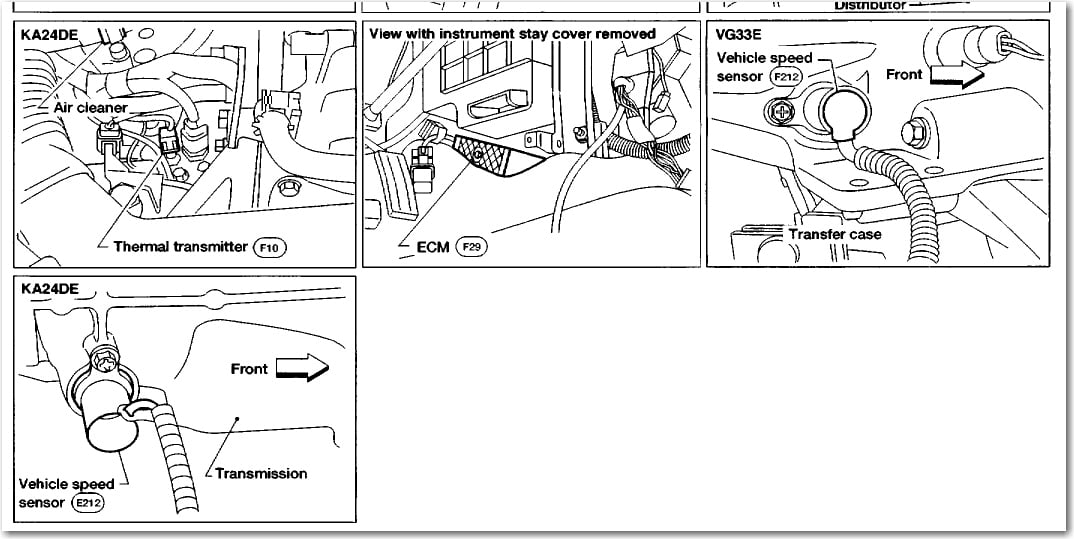
Alright, let's talk about locating the speed sensors on your 2004 Nissan Frontier. This isn't brain surgery, but knowing where these sensors are and what they do is crucial if you're dealing with speedometer issues, transmission problems, or even just trying to diagnose a pesky Check Engine Light (CEL).
First, it's important to distinguish between the two types of speed sensors your Frontier might have: the Vehicle Speed Sensor (VSS) and the Automatic Speed Sensor (also often called Revolution Sensor). While they both measure speed, they do so in different locations and for slightly different purposes. Knowing the difference is half the battle.
Understanding the Different Speed Sensors
The Vehicle Speed Sensor (VSS)
The VSS is the main sensor responsible for telling your speedometer how fast you're going. It also provides crucial information to the Powertrain Control Module (PCM), which uses this data for things like shift timing (in automatic transmissions), cruise control operation, and even engine management. Think of it as the car's main source of speed data.
The VSS on a 2004 Nissan Frontier is typically located on the transmission's tail housing. This is the rear section of the transmission, near where the driveshaft connects. Its location helps directly measure the output shaft rotation, translating to vehicle speed.
Finding it physically requires you to crawl under your truck. Look for a sensor with a wiring connector plugged into it. It's usually held in place by a single bolt or a small retaining clip. It will be at the rear of the transmission.
Common Symptoms of a Failing VSS:
- Erratic or non-functional speedometer
- Cruise control malfunction
- Rough or incorrect shifting (automatic transmissions)
- Check Engine Light (CEL) with codes related to speed sensors (e.g., P0500)
The Automatic Speed Sensor (Revolution Sensor)
The Automatic Speed Sensor or Revolution Sensor isn't *always* present, especially on manual transmission models. Even on automatics, there can be variations in the number and specific locations depending on the exact transmission model. However, it's important to be aware of its existence. These sensors are usually related to measuring the speed of input and output shafts within the automatic transmission itself.
Think of it this way: the VSS tells the PCM how fast the wheels are turning, while the Revolution Sensor(s) tell the PCM how fast things are spinning *inside* the transmission. This internal speed data is critical for the PCM to precisely control the transmission's shifting behavior.
On a 2004 Nissan Frontier with an automatic transmission, you'll generally find at least two of these sensors: an input speed sensor and an output speed sensor. These are often referred to as turbine speed sensors, especially in more advanced diagnostic tools. The input speed sensor measures the speed of the transmission's input shaft (connected to the engine), and the output speed sensor measures the speed of the output shaft (connected to the driveshaft).
Location: These sensors are usually mounted on the transmission case itself. Often, they are towards the front and rear of the main transmission body (not including the tail housing). You'll typically find them bolted into the transmission case with a single bolt each.
Common Symptoms of Failing Automatic Speed Sensors:
- Harsh or erratic shifting
- Transmission slipping
- Transmission not shifting at all
- Check Engine Light (CEL) with codes specifically related to transmission input or output speed (e.g., P0720, P0725)
Locating the Sensors: A Step-by-Step Guide
Okay, let's get practical. Here's how to find these sensors on your 2004 Nissan Frontier:
- Safety First: Always chock the rear wheels, engage the parking brake, and use jack stands when working under a vehicle. Disconnect the negative battery terminal to prevent electrical accidents.
- Locate the Transmission: Crawl under the vehicle and identify the transmission. It's the large component between the engine and the driveshaft.
- Find the VSS: Start by looking at the rear of the transmission (the tail housing). Search for a sensor with a wiring connector. It's usually held in place by a single bolt. Disconnect the connector and remove the bolt to remove the VSS.
- Locate the Automatic Speed Sensors (if applicable): Now, focus on the main body of the automatic transmission. You're looking for two similar sensors, one near the front and one near the rear of the transmission case (but *not* on the tail housing like the VSS). These sensors will also have wiring connectors and be secured with a single bolt each. Disconnect the connectors and remove the bolts to access the sensors.
Troubleshooting Tips and Considerations
Before you replace a sensor, consider these troubleshooting tips:
- Check the Wiring: Inspect the wiring harness and connectors for any signs of damage, corrosion, or loose connections. A bad connection can often mimic a failing sensor. Use a multimeter to check for continuity in the wiring.
- Check the Sensor Connector: Ensure the connector is clean and free of debris. Use electrical contact cleaner to clean the connector terminals.
- Test the Sensor (if possible): While testing can be tricky without specialized equipment, you can sometimes use a multimeter to check the sensor's resistance. Compare the resistance reading to the specifications in your vehicle's repair manual. However, this is not always reliable, and a sensor can test "good" but still fail under operating conditions.
- Scan for Codes: Use an OBD-II scanner to read any Diagnostic Trouble Codes (DTCs) stored in the PCM. This can help pinpoint the source of the problem. Always record the codes before clearing them.
- Consider OEM vs. Aftermarket: When replacing sensors, it's generally recommended to use OEM (Original Equipment Manufacturer) parts if possible. Aftermarket sensors can sometimes be unreliable or have compatibility issues.
- Check the Tone Ring/Reluctor Wheel: The VSS and speed sensors rely on a toothed wheel (tone ring or reluctor wheel) to generate a signal. If this wheel is damaged or corroded, it can cause inaccurate readings. This tone ring is usually part of the output shaft on the VSS and built into the transmission for input and output speed sensors. Inspect the visible part of the tone ring for damage, but access to the full ring usually requires transmission disassembly.
Tools You'll Need
Here's a list of tools you'll likely need for this job:
- Jack and Jack Stands
- Wheel Chocks
- Socket Set (metric)
- Wrench Set (metric)
- Screwdrivers (Phillips and flathead)
- Pliers
- OBD-II Scanner
- Multimeter
- Electrical Contact Cleaner
- Penetrating Oil
Final Thoughts
Locating and troubleshooting speed sensors on your 2004 Nissan Frontier can save you money and give you a better understanding of your vehicle's systems. Remember to take your time, be methodical, and don't hesitate to consult a repair manual or online resources if you get stuck. If you're not comfortable working on your vehicle, it's always best to take it to a qualified mechanic. Good luck!