
2008 Nissan Titan Driver Seat Replacement
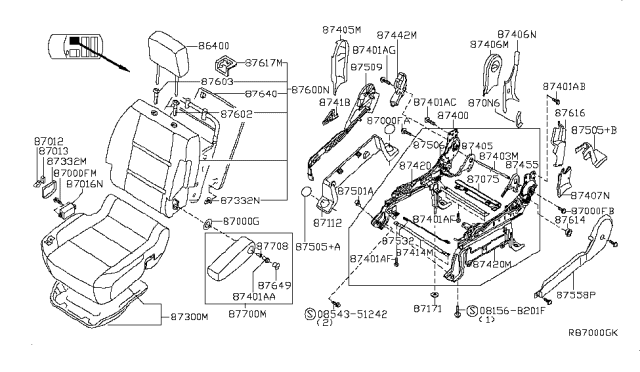
Replacing the driver's seat in your 2008 Nissan Titan can breathe new life into your truck, improve comfort, or allow for upgrades like aftermarket seats. Whether your original seat is worn, damaged, or you simply want something different, this guide will walk you through the process, step-by-step. We'll cover safety precautions, tools needed, and detailed instructions to ensure a successful installation.
Safety First: Disconnecting the Battery
Before you even think about touching anything electrical in your Titan, the very first step is to disconnect the negative battery terminal. This prevents accidental deployment of the airbags and avoids any potential electrical shorts during the seat removal and installation. An airbag deployment, even at low speeds, can cause serious injury. Trust me, it’s not worth the risk.
Here’s how to disconnect the battery:
- Locate the battery, usually under the hood, but sometimes in less accessible locations depending on the trim level. Consult your owner's manual if you're unsure of its location.
- Use a wrench (typically a 10mm or 13mm) to loosen the nut on the negative (-) battery terminal. It’s usually marked with a “-” symbol or is black in color.
- Once the nut is loose, carefully detach the negative terminal cable from the battery post.
- Tuck the disconnected cable away from the battery post to prevent accidental contact.
Important Note: Disconnecting the battery will reset your radio presets and potentially other electronic settings. Be prepared to reprogram them after reconnecting the battery.
Tools and Materials You'll Need
Having the right tools on hand makes the job much easier and safer. Here's a list of what you'll likely need:
- Socket set: A metric socket set is essential. Look for sockets in sizes ranging from 10mm to 17mm. A deep socket set can also be helpful, especially for reaching recessed bolts.
- Wrenches: A set of metric wrenches mirroring your socket sizes.
- Screwdrivers: Both Phillips head and flathead screwdrivers.
- Torx bit set: Some components might be secured with Torx screws. A T30 or T40 is common, but a complete set will cover all bases.
- Pliers: Needle-nose pliers can be helpful for disconnecting electrical connectors.
- Trim removal tools: These are plastic tools designed to safely remove interior trim panels without damaging them. A flathead screwdriver can work, but it increases the risk of scratches and breakage.
- New seat (or replacement parts): Obviously! Ensure the replacement seat is compatible with your 2008 Nissan Titan's model year and trim level. Check for compatibility with features like side airbags and seat heaters.
- Penetrating oil: A good penetrating oil like PB Blaster or WD-40 can help loosen stubborn bolts.
- Shop towels or rags: For cleaning up spills and protecting surfaces.
- Work light: Good lighting is crucial for seeing what you're doing.
- Multimeter (optional but recommended): For checking electrical connections.
- Torque wrench: For tightening bolts to the manufacturer's specified torque settings.
Removing the Old Seat
Now for the main event. Take your time and work carefully to avoid damaging anything. It's helpful to take pictures as you go, especially of wiring connections, so you can easily refer back to them during reinstallation.
Step 1: Accessing the Seat Mounting Bolts
The driver's seat is typically secured by four bolts located at the corners of the seat rails. These bolts attach the seat to the floor of the vehicle.
Pro Tip: Move the seat forward and backward to gain better access to all four bolts. You may need to tilt the seat forward or backward as well to get the right angle.
Step 2: Removing the Seat Mounting Bolts
Using the appropriate socket and wrench (likely 14mm or 17mm, but always check), loosen and remove all four seat mounting bolts. If the bolts are stubborn, apply penetrating oil and let it soak for a few minutes before trying again. Avoid stripping the bolt heads – that turns a simple task into a nightmare.
Important: Store the bolts in a safe place so you don't lose them! It's a good idea to label a container for all the parts associated with the seat removal. This helps with reassembly.
Step 3: Disconnecting Electrical Connectors
Once the seat is unbolted, carefully tilt it back to access the electrical connectors underneath. These connectors provide power for features like seat heaters, power adjustments, and the seat's airbag system. This is where disconnecting the battery becomes absolutely critical.
Locate each connector and carefully disconnect it. Most connectors have a locking mechanism – a small tab or clip that needs to be pressed or released before the connector can be pulled apart. Use your trim removal tools or needle-nose pliers to gently release the locking mechanism. Never force a connector; you risk damaging the pins or wiring.
Note: It's a good practice to label each connector with a piece of masking tape, indicating where it goes. This will save you time and frustration during reinstallation.
Step 4: Removing the Seat from the Vehicle
With all the bolts removed and the electrical connectors disconnected, you can now carefully remove the seat from the vehicle. Be mindful of the door jambs and interior trim to avoid scratches or damage. You may need to maneuver the seat to get it out of the truck. Having a second person help can make this step much easier.
Pro Tip: Cover the door sill and center console with a blanket or towel to protect them from scratches during seat removal.
Once the seat is out, place it on a clean, protected surface.
Installing the New Seat
Installation is essentially the reverse of removal. However, pay close attention to these key points:
Step 1: Connecting Electrical Connectors
Carefully connect all the electrical connectors to the corresponding plugs on the new seat. Refer to your labels or photos to ensure you're connecting everything correctly. Make sure each connector clicks into place, indicating a secure connection.
Verify each connection is secure. Give each connector a gentle tug to ensure it's properly locked. A loose connection can cause electrical problems or prevent certain seat features from working.
Step 2: Aligning and Bolting Down the Seat
Carefully position the new seat inside the vehicle, aligning the seat rails with the mounting holes in the floor. Install the seat mounting bolts, tightening them by hand initially. Once all four bolts are in place, use a torque wrench to tighten them to the manufacturer's specified torque settings. You can find these settings in your vehicle's service manual or online resources. Over-tightening can damage the threads and under-tightening can lead to a loose seat.
Step 3: Double-Checking and Testing
Before reconnecting the battery, double-check that all electrical connectors are securely connected and that all four seat mounting bolts are properly tightened.
Reconnect the negative battery terminal. Start the engine and test all the seat functions, including power adjustments, seat heaters, and lumbar support (if equipped). Also, check that there are no airbag warning lights illuminated on the dashboard. If an airbag warning light is present, it indicates a problem with the seat's airbag system. Consult a qualified mechanic to diagnose and repair the issue. The use of a scan tool capable of reading ABS/SRS codes will be required to clear the light, if the error was simply a momentary disconnect from the install.
Final Inspection: Before declaring victory, give the seat a thorough once-over. Make sure it moves smoothly, that all features work as expected, and that there are no loose wires or connections. Clean up any tools or debris and enjoy your newly installed seat!
By following these steps carefully, you should be able to successfully replace the driver's seat in your 2008 Nissan Titan and experience greater comfort and improved functionality. Remember, safety is paramount, so take your time and double-check your work. If you're unsure about any part of the process, consult a qualified mechanic.