
2012 Nissan Frontier Airbag Light Flashing
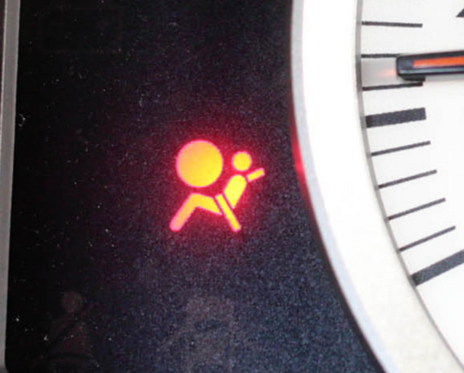
So, you've got a flashing airbag light on your 2012 Nissan Frontier. Annoying, right? More importantly, it signals a potential problem with your Supplemental Restraint System (SRS), which includes your airbags, seatbelt pre-tensioners, and associated sensors. A flashing airbag light means the system isn't operating correctly, and in a collision, your airbags might not deploy as they should – or worse, deploy unexpectedly. This guide will walk you through the troubleshooting steps, assuming you have some mechanical aptitude and access to basic tools. Safety first: always disconnect the negative battery terminal before working on any electrical components.
Understanding the Airbag System and its Diagnostic Mode
The SRS in your Frontier is a complex network. It relies on sensors strategically placed around the vehicle to detect collisions. These sensors feed information to the Airbag Control Module (ACM), also sometimes referred to as the SRS control unit. The ACM constantly monitors the system's health and, when it detects a fault, it illuminates the airbag warning light. The flashing pattern is actually a diagnostic code that can help pinpoint the problem.
Before you start tearing things apart, you need to retrieve the diagnostic trouble code (DTC). Nissan vehicles have a built-in diagnostic mode that you can access. Here’s how to do it:
- Turn the ignition key to the ON position (but don't start the engine). Make sure the airbag light is flashing.
- Wait approximately 7 seconds. The airbag light should stop flashing and stay illuminated for a few seconds.
- Immediately (within 1 second) turn the ignition key OFF.
- Wait approximately 3 seconds.
- Repeat steps 1-3 twice more (three times total).
- Now, turn the ignition key ON again. The airbag light should begin flashing a code.
Interpreting the code: The airbag light will flash a series of long and short flashes. Count the number of long flashes first, then the short flashes. This gives you a two-digit code. For example, three long flashes followed by two short flashes indicates code 32. Write this code down! It's crucial for diagnosing the problem.
If the procedure doesn't work the first time, don't get discouraged. It can be a bit finicky. Try it again, paying close attention to the timing. The key is to be precise with the key turns and waiting periods. Some newer scan tools can also read these codes directly, bypassing this manual process.
Common Causes and Troubleshooting
Now that you have the DTC, you can start troubleshooting. Here are some common issues and their associated diagnostic codes (Note: these are common issues, but the exact code may vary. Always refer to a Nissan service manual for definitive code definitions):
Code B1018 (Driver Airbag Module Circuit Open)
This code often indicates a problem with the clock spring, which is located behind the steering wheel. The clock spring is a coiled ribbon cable that allows the steering wheel to rotate while maintaining electrical connections to the airbag, horn, and sometimes other controls. Repeated steering wheel use can cause the clock spring to break or develop poor connections.
Troubleshooting steps:
- Inspect the clock spring connector: Disconnect the negative battery terminal. Carefully remove the steering wheel airbag (consult your service manual for specific instructions – it usually involves releasing spring clips). Disconnect the clock spring connector and inspect the pins for corrosion or damage. Clean the pins with electrical contact cleaner and reconnect.
- Check clock spring continuity: Use a multimeter to check the continuity of the clock spring. A break in continuity indicates a faulty clock spring that needs replacement. A Nissan service manual will have the specific pinout and resistance values to check.
- Consider professional replacement: Replacing the clock spring requires careful alignment to ensure proper function. If you're not comfortable with this procedure, it's best to take it to a professional.
Code B1013 (Passenger Airbag Module Circuit Open)
Similar to the driver's side, this code suggests an issue with the passenger airbag. The problem could be with the airbag module itself, the wiring harness, or the connector.
Troubleshooting steps:
- Inspect the passenger airbag connector: Disconnect the negative battery terminal. Locate the passenger airbag (usually in the dashboard). Disconnect the airbag connector and inspect the pins for corrosion or damage. Clean the pins with electrical contact cleaner and reconnect.
- Check wiring harness: Trace the wiring harness from the airbag module to the ACM. Look for any signs of damage, such as cuts, abrasions, or pinched wires.
- Airbag Module: It’s rare but possible that the airbag module itself is faulty. This is best diagnosed by a professional, as it requires specialized tools and knowledge to test.
Code B1022 (Driver Seatbelt Pre-tensioner Circuit Open) or B1027 (Passenger Seatbelt Pre-tensioner Circuit Open)
Seatbelt pre-tensioners tighten the seatbelt in the event of a collision, reducing the occupant's forward movement. These codes indicate a problem with the pre-tensioner circuit.
Troubleshooting steps:
- Inspect the seatbelt pre-tensioner connector: Disconnect the negative battery terminal. Locate the seatbelt pre-tensioner (usually integrated into the seatbelt buckle mechanism). Disconnect the connector and inspect the pins for corrosion or damage. Clean the pins with electrical contact cleaner and reconnect.
- Check wiring harness: Trace the wiring harness from the pre-tensioner to the ACM. Look for any signs of damage.
- Resistance Check: A Nissan service manual will list the appropriate resistance for the pre-tensioner. Use a multimeter to verify.
Code B1000 (Airbag Control Module (ACM) Fault)
This code is more serious, indicating a potential problem with the ACM itself. It could be a hardware failure, a software issue, or corrupted data.
Troubleshooting steps:
- Check ACM connections: Locate the ACM (usually under the center console or under the seats). Disconnect the connectors and inspect the pins for corrosion or damage. Clean the pins with electrical contact cleaner and reconnect. Ensure all connections are secure.
- Check power and ground: Verify that the ACM is receiving proper power and ground. Use a multimeter to check the voltage at the power pins and the continuity to ground.
- Consider ACM replacement or reprogramming: If the ACM is indeed faulty, it will need to be replaced or reprogrammed. This often requires specialized equipment and software, so it's best left to a professional. Keep in mind that a used ACM will likely need to be reprogrammed to your specific vehicle's VIN (Vehicle Identification Number).
Other Potential Causes and Considerations
- Loose connections: As mentioned above, loose or corroded connections are a common cause of airbag light issues. Carefully inspect all connectors in the SRS circuit, paying close attention to the ones located under the seats, as they are prone to getting kicked or damaged.
- Damaged wiring: Rodents can sometimes chew on wiring harnesses, causing shorts or open circuits. Inspect the wiring harnesses for any signs of damage.
- Aftermarket modifications: If you've recently installed any aftermarket accessories, such as a new stereo or alarm system, they could be interfering with the SRS. Disconnect the accessories and see if the airbag light goes away.
- Prior accidents: Even a minor fender bender can sometimes trigger the airbag light, even if the airbags didn't deploy. The impact sensors may have been damaged or the system may need to be reset.
- Low voltage: A weak battery can sometimes cause the ACM to malfunction. Ensure your battery is in good condition and fully charged.
Clearing the Airbag Light
Once you've identified and fixed the problem, you need to clear the diagnostic code and turn off the airbag light. On some Nissan models, you can clear the code by disconnecting the negative battery terminal for at least 10 minutes. However, this method may not always work, especially for more persistent codes.
The most reliable way to clear the code is with a scan tool that is capable of accessing the SRS module. These scan tools can communicate with the ACM and clear the stored DTCs. After clearing the code, start the engine and see if the airbag light stays off. If it comes back on, it means the problem hasn't been fully resolved.
Important Safety Considerations
- Always disconnect the negative battery terminal before working on any electrical components, including the airbag system. This will prevent accidental airbag deployment.
- Never probe airbag connectors with a multimeter unless specifically instructed to do so in a service manual. Probing the wrong pins can trigger airbag deployment.
- Handle airbags with care. They contain explosive components and can be dangerous if mishandled.
- Consult a Nissan service manual for specific procedures and torque specifications.
- If you're not comfortable working on the airbag system, it's best to take your vehicle to a qualified mechanic. The SRS is a safety-critical system, and it's important to ensure that it's functioning properly.
When to Seek Professional Help
While this guide provides a comprehensive overview of troubleshooting a flashing airbag light on a 2012 Nissan Frontier, some issues are best left to professionals. If you're unable to identify the cause of the problem or if you're not comfortable working on the airbag system, it's always best to seek professional help. A qualified mechanic will have the necessary tools, knowledge, and experience to diagnose and repair the system safely and effectively.
Disclaimer: This guide is for informational purposes only and should not be considered a substitute for professional advice. Always consult a qualified mechanic for any repairs or maintenance on your vehicle. Working on the airbag system can be dangerous, and it's important to take all necessary safety precautions.