
2016 Nissan Pathfinder Key Fob Programming
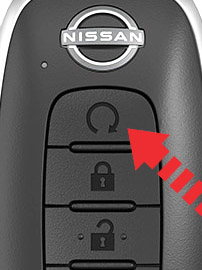
The 2016 Nissan Pathfinder, a popular family SUV, utilizes a sophisticated keyless entry system centered around its key fob. While dealer programming is always an option, understanding the underlying process allows mechanically inclined owners to potentially program new fobs themselves or troubleshoot existing ones. This article delves into the technical aspects of 2016 Nissan Pathfinder key fob programming, explaining the communication protocols, security measures, and procedures involved.
Understanding the Key Fob and Vehicle Communication
At its core, the key fob acts as a miniature radio transmitter. It houses a microcontroller, a radio frequency (RF) transmitter, and a battery. Pressing a button on the fob initiates a specific command, which is then encoded into a radio signal and broadcasted. The 2016 Pathfinder's Body Control Module (BCM) contains an RF receiver constantly listening for these signals. Upon receiving a signal, the BCM verifies its authenticity and, if valid, executes the corresponding action – unlocking the doors, activating the panic alarm, or starting the engine (if equipped with remote start).
The communication isn't just one-way. The vehicle can also transmit signals back to the key fob, particularly during the programming process. This two-way communication ensures secure pairing and prevents unauthorized access.
Frequency and Modulation
The 2016 Pathfinder's key fob operates on a specific radio frequency, typically within the 315 MHz or 433 MHz band depending on the region. The exact frequency is crucial and must match the BCM's receiver. The RF signal is modulated using a technique like Amplitude Shift Keying (ASK) or Frequency Shift Keying (FSK). This modulation encodes the digital information (the specific command and security codes) onto the carrier wave.
Security Protocols: Rolling Codes and Encryption
To prevent replay attacks (where a thief intercepts and re-transmits a valid unlock signal), modern key fobs employ rolling codes. Each time a button is pressed, the key fob increments a counter and generates a new, unique code. The BCM anticipates this change and maintains a synchronization window. If the received code falls within this window (allowing for occasional missed button presses), it's considered valid. This rolling code scheme significantly enhances security.
Furthermore, the data transmitted between the key fob and the BCM is often encrypted. This encryption prevents eavesdropping and ensures that even if someone intercepts the RF signal, they cannot decipher the command being sent. Common encryption algorithms used in automotive systems include AES (Advanced Encryption Standard) or proprietary encryption methods developed by the vehicle manufacturer.
Key Fob Programming Procedures: A Detailed Look
Programming a key fob involves teaching the BCM to recognize the unique identification code of the new fob. While specific procedures can vary slightly depending on the model year and trim level, the general principles remain the same. Here's a breakdown of common methods:
Method 1: On-Board Programming (Requires a Working Key)
This method relies on the vehicle's existing security system to authenticate the programming process. It typically requires at least one already programmed key fob.
- Preparation: Ensure all doors are closed and unlocked. Have all key fobs you wish to program ready.
- Ignition Cycling: Insert the working key into the ignition. Cycle the ignition rapidly between the "ON" and "OFF" positions a specific number of times (e.g., 6 times) within a defined timeframe (e.g., 10 seconds). The exact number and timeframe are critical and specific to the vehicle.
- Confirmation Mode: If the cycling is successful, the hazard lights should flash, indicating that the vehicle has entered programming mode.
- Programming New Fobs: Press and hold the "UNLOCK" button on the new key fob for a few seconds. The hazard lights should flash again, confirming that the fob has been recognized. Repeat this step for any additional fobs.
- Exiting Programming Mode: Remove the key from the ignition or start the vehicle to exit programming mode. Test all programmed fobs to ensure they function correctly.
Important Considerations:
- The timing of the ignition cycling is extremely critical. If the timing is off, the vehicle will not enter programming mode.
- This method usually has a limited number of key fobs that can be programmed (typically 4-5).
- If the vehicle fails to enter programming mode after multiple attempts, there may be an underlying issue with the BCM or the existing key fob.
Method 2: Using an OBDII Programmer
This method utilizes an aftermarket OBDII (On-Board Diagnostics II) programmer, which connects to the vehicle's diagnostic port. These programmers often offer more advanced features, including the ability to program key fobs even without a working key.
- Connect the Programmer: Plug the OBDII programmer into the vehicle's diagnostic port (usually located under the dashboard).
- Follow Programmer Instructions: The programmer will typically have a menu-driven interface. Navigate to the key fob programming section and follow the on-screen instructions.
- PIN Code Retrieval (if required): Some vehicles require a PIN code (also known as a security code) to access the key fob programming function. The OBDII programmer may be able to retrieve this code from the vehicle's memory or require manual input.
- Programming New Fobs: The programmer will typically prompt you to press a button on the new key fob to initiate the programming process.
- Verification: After programming, the programmer will usually verify that the new key fob is recognized by the BCM.
Important Considerations:
- The OBDII programmer must be compatible with the 2016 Nissan Pathfinder. Verify compatibility before purchasing.
- Some programmers require a subscription or license to access certain functions, including key fob programming.
- PIN code retrieval may not be possible on all vehicles, requiring you to obtain the code from a dealer or locksmith.
Method 3: Professional Programming (Dealer or Locksmith)
This method involves taking the vehicle to a Nissan dealer or a qualified automotive locksmith. They have specialized equipment and access to the necessary databases to program key fobs securely and efficiently.
- Provide Vehicle Information: The dealer or locksmith will need the vehicle's VIN (Vehicle Identification Number) and proof of ownership.
- Programming: They will use their specialized equipment to access the vehicle's BCM and program the new key fob.
- Testing: After programming, they will test the new key fob to ensure it functions correctly.
Important Considerations:
- This method is typically the most expensive option but also the most reliable.
- Dealers and locksmiths have access to the latest software and security protocols, ensuring a secure and successful programming process.
Troubleshooting Common Programming Issues
Key fob programming can sometimes be problematic. Here are some common issues and potential solutions:
- Vehicle Not Entering Programming Mode: Verify that the ignition cycling procedure is being performed correctly. Check the battery voltage of the existing key fob. A low battery can sometimes prevent the vehicle from entering programming mode. Also, a faulty ignition switch could be the root cause.
- Key Fob Not Responding After Programming: Ensure that the key fob battery is good. Try reprogramming the fob again. Check the key fob for physical damage.
- OBDII Programmer Not Communicating with Vehicle: Verify that the programmer is compatible with the vehicle. Check the diagnostic port for any damage or corrosion. Ensure that the programmer is properly connected to the vehicle.
- PIN Code Issues: If the programmer requires a PIN code, ensure that the code is entered correctly. If the programmer cannot retrieve the PIN code, contact a dealer or locksmith for assistance.
- Interference: Radio frequency interference can sometimes disrupt the programming process. Try programming the key fob in an area away from potential sources of interference, such as cell towers or other electronic devices.
Security Best Practices
Key fob security is paramount to preventing vehicle theft. Here are some important security best practices:
- Protect Your Key Fobs: Store your key fobs in a secure location and avoid leaving them unattended in public places.
- Be Aware of Skimming: Be cautious of individuals who may be trying to skim your key fob's signal. Skimming devices can intercept and record the RF signal, allowing thieves to unlock and steal your vehicle.
- Consider a Faraday Bag: A Faraday bag is a specialized pouch that blocks RF signals. Storing your key fob in a Faraday bag can prevent skimming and replay attacks.
- Regularly Check Your Locks: Ensure that your vehicle's doors and trunk are properly locked.
Conclusion
Understanding the technical aspects of 2016 Nissan Pathfinder key fob programming empowers owners to make informed decisions about key replacement and troubleshooting. While DIY programming can be a cost-effective option, it's crucial to proceed with caution and follow the correct procedures. If you encounter any difficulties or are unsure about any aspect of the programming process, it's always best to consult with a qualified professional.
Disclaimer: This article provides general information about key fob programming and should not be considered a substitute for professional advice. The specific procedures and requirements may vary depending on the vehicle model and trim level. Always consult the vehicle's owner's manual and follow the manufacturer's recommendations.