
2017 Nissan Altima Center Console Removal
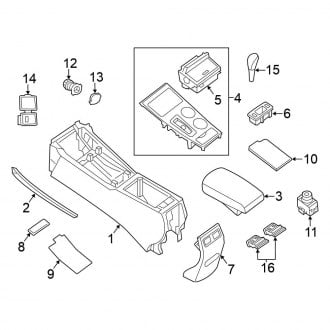
Hey there, Altima owner! Having some trouble with your center console? Whether you're tackling a broken shifter, replacing a worn-out USB port, or just giving the interior a deep clean, knowing how to remove the center console in your 2017 Nissan Altima is key. It might seem daunting, but with a little patience and the right tools, it's a project you can definitely handle. This guide will walk you through the process step-by-step. Think of me as your friendly neighborhood mechanic giving you the inside scoop.
Why Remove the Center Console?
Before we dive in, let's quickly cover why you might need to do this. The center console isn't just a storage bin; it houses crucial components like:
- Shifter Assembly: Problems with shifting, difficulty getting into gear, or a loose shifter handle often require console removal.
- Multimedia System Components: Many connections for your infotainment system, including USB ports and AUX inputs, are located within the console.
- Parking Brake Mechanism: Accessing and repairing the parking brake cable sometimes requires console removal.
- Wiring Harnesses: Diagnosing electrical issues related to lighting, switches, or other accessories in the center area may necessitate taking the console out.
- General Cleaning and Maintenance: A thorough cleaning or spill cleanup is much easier with the console removed.
Ignoring these issues can sometimes lead to more significant problems down the road. For example, a sticky shifter might eventually cause damage to the transmission. Addressing these concerns early can save you money and headaches in the long run.
Tools You'll Need
To successfully remove the center console, gather these tools:
- Phillips Head Screwdriver: A standard Phillips head screwdriver is essential.
- Flat Head Screwdriver or Plastic Trim Removal Tools: These are used to gently pry off plastic trim pieces without causing damage. Avoid using metal screwdrivers aggressively, as they can scratch or break the plastic.
- Socket Set with Extension: You'll likely encounter bolts securing the console to the vehicle's frame. A socket set with various sizes and an extension will be needed. Common sizes are 10mm and 12mm.
- Small Ratchet: For tighter spaces where a full-sized socket wrench won't fit.
- Gloves (Optional): Protect your hands from dirt and grime.
- Small Container or Magnetic Tray: To keep track of screws and bolts. Trust me, you don't want to lose these!
- Shop Towels or Rags: For wiping up any spills or dirt.
Step-by-Step Removal Guide
Now, let's get to the good stuff! Follow these steps carefully:
Step 1: Preparation and Safety First
Before you even touch a tool, make sure the car is parked on a level surface, the parking brake is engaged, and the ignition is turned off. Disconnecting the negative terminal of the battery is always a good safety precaution. This prevents accidental electrical shocks or damage to the car's electrical system. Wait a few minutes after disconnecting the battery before proceeding to allow any stored electricity to dissipate.
Step 2: Removing the Shifter Knob and Trim
The first step is to remove the shifter knob. The method varies slightly depending on whether you have an automatic or manual transmission.
- Automatic Transmission: Most automatic shifters have a button on the side that you need to depress while pulling the knob straight up. Sometimes, you might need to rotate the knob slightly before it releases. Don't force it; wiggle it gently until it comes loose.
- Manual Transmission: Usually, manual shifters are threaded. Simply unscrew the knob by turning it counterclockwise.
Next, carefully pry up the trim piece surrounding the shifter. Use your plastic trim removal tools (or a flathead screwdriver with extreme caution) to gently lift the edges. There are usually clips holding it in place. Work your way around the perimeter, releasing each clip until the trim piece comes free. Disconnect any electrical connectors attached to the trim piece, such as those for the shifter indicator lights.
Step 3: Removing the Side Panels
On either side of the center console, you'll find side panels, typically made of plastic. These panels are usually held in place by clips. Again, use your trim removal tools to carefully pry them off. Start at the bottom and work your way up. Be patient and avoid forcing them; you don't want to break the clips. Once the panels are loose, disconnect any electrical connectors attached to them, such as those for seat heater switches or 12V power outlets.
Step 4: Removing the Rear Console Panel (if applicable)
Some Altima models have a rear console panel that houses vents or controls for rear passengers. If your car has this, you'll need to remove it. Look for screws hidden under small plastic covers or within the rear vents. Once you've located and removed the screws, gently pry off the panel, being mindful of any electrical connectors.
Step 5: Locating and Removing Screws and Bolts
Now comes the main part. Carefully inspect the center console for any visible screws or bolts. Common locations include:
- Inside the storage compartment at the bottom of the console.
- Underneath the shifter trim you removed earlier.
- Along the sides of the console, near the seats.
- At the front of the console, near the dashboard.
Use your Phillips head screwdriver and socket set to remove all the screws and bolts you find. Place them in your container or magnetic tray to avoid losing them. Make a note of where each screw/bolt came from, as they may be different sizes.
Step 6: Disconnecting Electrical Connectors
Before you can completely remove the console, you'll need to disconnect any remaining electrical connectors. These might be for things like the USB port, AUX input, or any other accessories located within the console. Gently squeeze the tabs on the connectors and pull them apart. Never yank on the wires, as this can damage them.
Step 7: Lifting Out the Center Console
With all the screws, bolts, and electrical connectors removed, you should now be able to lift the center console out of the car. Before lifting, double-check that you haven't missed any screws or connectors. If the console feels stuck, don't force it; carefully inspect the area to see what's holding it in place. Lift the console straight up and out of the vehicle. You may need to angle it slightly to clear the seats or dashboard.
Step 8: Post-Removal Inspection
Once the console is out, take a moment to inspect the area beneath it. Clean up any debris or spills. This is also a good time to inspect any wiring harnesses for damage or corrosion. If you're replacing a part, now's the time to install the new one.
Reassembly
Reassembly is essentially the reverse of the disassembly process. Follow these steps carefully:
- Reconnect Electrical Connectors: Make sure all electrical connectors are properly connected.
- Position the Console: Carefully lower the console back into place, aligning it with the mounting points.
- Install Screws and Bolts: Secure the console with the screws and bolts you removed earlier. Make sure to use the correct screws/bolts for each location.
- Reinstall Side Panels, Rear Panel (if applicable), and Shifter Trim: Snap the side panels and rear panel back into place, and reinstall the shifter trim.
- Reinstall Shifter Knob: Screw or push the shifter knob back onto the shifter lever.
- Reconnect Battery (if disconnected): Reconnect the negative terminal of the battery.
Once everything is reassembled, test all the components to make sure they are working properly. Check the shifter, USB ports, AUX input, and any other accessories that are located within the console.
Troubleshooting Tips
- Stuck Trim Pieces: If a trim piece is stuck, don't force it. Use your trim removal tools to gently work around the edges, releasing the clips one by one.
- Lost Screws/Bolts: If you lose a screw or bolt, try to find a replacement at your local hardware store. Make sure the replacement is the correct size and thread pitch.
- Electrical Problems: If you encounter any electrical problems after reassembly, double-check all the electrical connectors to make sure they are properly connected. Also, check the fuses to see if any are blown.
Estimated Repair Costs
The cost of removing and replacing the center console will vary depending on the specific repair you're performing. If you're just cleaning or accessing a simple component, the cost will be minimal (just your time and maybe a few dollars for cleaning supplies). However, if you're replacing a major component like the shifter assembly or the multimedia system, the cost could be significantly higher.
- DIY: If you do it yourself, the cost will be limited to the price of the replacement part (if any).
- Professional Mechanic: Expect to pay anywhere from $150 to $500+ for a professional mechanic to remove and replace the center console, depending on the complexity of the job and the mechanic's hourly rate. Always get a quote before authorizing any work.
Final Thoughts
Removing the center console in your 2017 Nissan Altima can be a rewarding DIY project. By following these steps and taking your time, you can save money and gain a better understanding of your car. Remember to be patient, use the right tools, and don't hesitate to ask for help if you get stuck. Good luck, and happy wrenching!