
2002 Toyota Camry Evap System Diagram
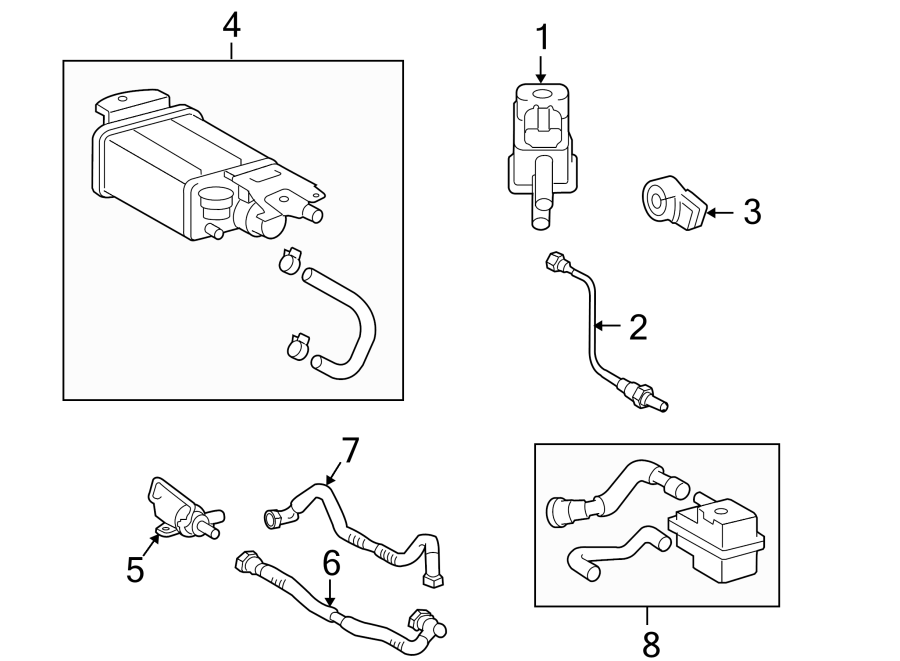
Alright folks, let's dive into the Evaporative Emission Control (EVAP) system diagram for a 2002 Toyota Camry. Whether you're tracking down a pesky check engine light, getting a better understanding of how your car manages fuel vapors, or just enjoy tinkering under the hood, this guide will break down the system piece by piece.
Purpose of Understanding the 2002 Camry EVAP Diagram
Why bother with this diagram in the first place? Well, it's your roadmap to diagnosing and repairing EVAP system issues. The EVAP system prevents gasoline vapors from escaping into the atmosphere, both when the engine is running and when it's off. A malfunctioning EVAP system can trigger a check engine light (typically a P0440 series code) and, more importantly, contribute to air pollution. Having the diagram allows you to:
- Pinpoint problems: The diagram shows the components and connections, helping you trace vacuum lines, electrical wires, and identify potential leak points.
- Understand the system's functionality: Seeing how the components interact provides a deeper understanding of how the system works.
- Perform repairs effectively: Instead of blindly replacing parts, you can use the diagram to isolate the faulty component.
- Save money: DIY repairs, when done correctly, can save you a significant amount of money compared to taking your car to a mechanic.
- Learn how to modify your car: In the rare chance you want to modify this component, learning how it works will save you time.
Key Specs and Main Parts of the 2002 Camry EVAP System
The 2002 Toyota Camry EVAP system is a fairly typical design for its era. Here's a rundown of the key components:
- Fuel Tank: This is where the gasoline is stored, and where fuel vapors are initially generated.
- Fuel Tank Pressure Sensor (FTP): Monitors the pressure inside the fuel tank. This data is crucial for the ECM (Engine Control Module) to manage the EVAP system.
- Canister: A container filled with activated charcoal. It absorbs and stores fuel vapors from the fuel tank until they can be purged into the engine.
- Canister Vent Valve (CVV): Controls the entry of fresh air into the charcoal canister. When the valve is open, fresh air enters the canister, allowing the vacuum from the engine to pull fuel vapors out. It's usually normally open (NO) and is closed by the ECM.
- Canister Purge Valve (CPV): Controls the flow of fuel vapors from the canister to the engine intake manifold. The ECM controls this valve, opening it at appropriate times to purge the stored vapors.
- Vapor Lines (Hoses): These connect all the EVAP components, carrying fuel vapors. Look for cracks, leaks, or dry rot in these lines.
- Check Valve: A one-way valve that ensures fuel vapors only flow in one direction, preventing backflow.
- ECM (Engine Control Module): The brain of the system. It receives data from sensors (like the FTP) and controls the valves (CVV and CPV) based on various engine parameters.
Understanding Symbols on the Diagram
The EVAP system diagram uses standard automotive symbols and conventions. Here's a breakdown:
- Solid Lines: Typically represent vacuum or vapor lines carrying fuel vapors. Follow these lines to trace the flow of vapors throughout the system.
- Dotted Lines: Often indicate electrical wiring or signal pathways. These lines connect sensors and valves to the ECM.
- Arrows: Show the direction of flow, whether it's the flow of fuel vapors, air, or electrical signals.
- Components: Each component is represented by a specific symbol. The canister is usually depicted as a rectangular container, valves are shown as circles with arrows indicating flow direction, and sensors have their own unique symbols. Refer to a legend provided with the diagram, if available, for specific symbol meanings.
- Color Coding: Some diagrams use color coding to differentiate between different types of lines (e.g., vacuum lines, fuel lines, electrical wires). However, many diagrams are black and white, so always check the accompanying legend.
- Ground Symbol: Looks like an upside down Christmas tree and is used to show electrical ground location.
How the 2002 Camry EVAP System Works
Here's the basic operational cycle of the EVAP system:
- Vapor Generation: Fuel in the tank evaporates, creating fuel vapors.
- Vapor Storage: These vapors are routed to the charcoal canister via vapor lines. The activated charcoal absorbs and stores the vapors, preventing them from escaping into the atmosphere.
- Purge Cycle: When the engine is running and conditions are right (e.g., engine is warmed up, vehicle is cruising), the ECM commands the Canister Purge Valve (CPV) to open.
- Air Intake: Simultaneously, the ECM may also command the Canister Vent Valve (CVV) to open, allowing fresh air to enter the canister.
- Vapor Flow: The engine's vacuum pulls fresh air through the canister, carrying the stored fuel vapors with it.
- Combustion: The fuel vapors are drawn into the engine's intake manifold and burned during normal combustion.
The ECM monitors the Fuel Tank Pressure Sensor (FTP) and other engine parameters to ensure the EVAP system is functioning correctly. It also performs self-tests (e.g., leak tests) to detect any leaks in the system. If a leak or other malfunction is detected, the ECM will typically set a diagnostic trouble code (DTC) and illuminate the check engine light.
Real-World Use: Basic Troubleshooting Tips
Okay, so you've got a check engine light and suspect it's EVAP-related. Here are some basic troubleshooting steps you can take, armed with your 2002 Camry EVAP system diagram:
- Visual Inspection: Carefully inspect all the vacuum lines and hoses for cracks, leaks, or disconnections. Pay close attention to the connections at the canister, valves, and fuel tank. This is often the source of EVAP leaks.
- Gas Cap: Believe it or not, a loose or faulty gas cap is a common cause of EVAP codes. Ensure the gas cap is properly tightened and that the rubber seal is in good condition. Replacing the gas cap is a cheap and easy first step.
- Smoke Test: This is a more advanced diagnostic technique that involves injecting smoke into the EVAP system and looking for leaks. You'll need a smoke machine for this.
- Valve Testing: You can test the Canister Purge Valve (CPV) and Canister Vent Valve (CVV) using a multimeter and applying voltage to see if they open and close correctly. Refer to the service manual for the specific testing procedure.
- FTP Sensor: Check the FTP sensor for proper voltage and resistance. Again, refer to the service manual for specifications.
- OBDII Scanner: Use an OBDII scanner to read the specific DTCs. This will give you a more precise idea of where the problem lies. Common codes include P0440 (Evaporative Emission Control System Malfunction), P0441 (Evaporative Emission Control System Incorrect Purge Flow), P0446 (Evaporative Emission Control System Vent Control Circuit Malfunction), and P0455 (Evaporative Emission Control System Leak Detected (Gross Leak)).
Remember: Always clear the DTCs after making repairs and then drive the vehicle to see if the code returns. It may take several drive cycles for the ECM to re-run its self-tests and confirm that the problem is resolved.
Safety Considerations
Working on the EVAP system involves handling fuel vapors, which are flammable. Here are some important safety precautions:
- Work in a well-ventilated area: Avoid working in enclosed spaces where fuel vapors can accumulate.
- No smoking or open flames: Keep all sources of ignition away from the work area.
- Disconnect the battery: Disconnect the negative battery terminal before working on any electrical components.
- Fuel Handling: If you need to disconnect fuel lines, be prepared for some fuel spillage. Have rags and a container on hand to catch any fuel.
- High Pressure: Fuel tanks can have pressure built-up. Relieve fuel pressure before doing any repair.
Diagram Availability
You've reached the end of this guide. It should give you a good fundamental understanding of the 2002 Toyota Camry Evap System. To further aid you, we have access to the complete EVAP system diagram file. Please contact us to gain access.