
2004 Chevy Silverado Radio Wiring Color Codes
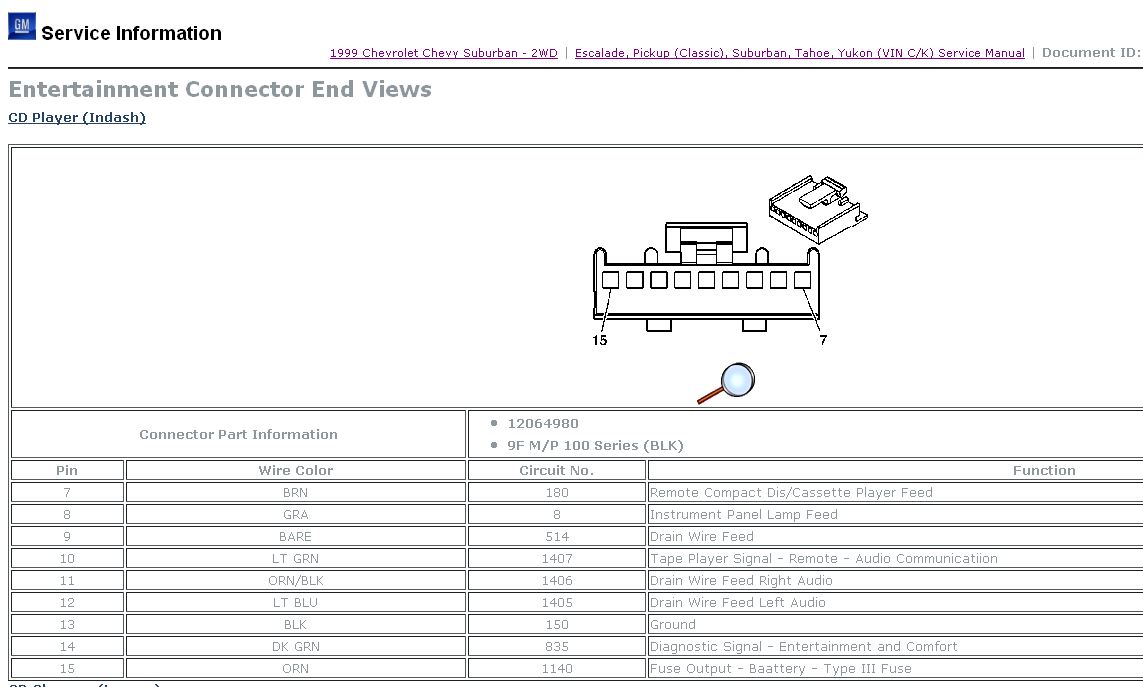
Working on the audio system of a 2004 Chevy Silverado can be a rewarding project, whether you're upgrading the head unit, adding an amplifier, or simply troubleshooting a wiring issue. However, without a clear understanding of the radio wiring color codes, you're navigating in the dark. This guide provides a comprehensive breakdown of the 2004 Silverado radio wiring, empowering you to tackle your audio projects with confidence.
Purpose of Understanding Radio Wiring
Knowing the 2004 Chevy Silverado radio wiring color codes is essential for a variety of tasks:
- Head Unit Replacement: Installing a new aftermarket head unit requires correctly identifying and connecting each wire to the corresponding function on the new unit.
- Amplifier Installation: Connecting an external amplifier involves tapping into specific wires for signal input and remote turn-on.
- Speaker Upgrades: Replacing factory speakers may necessitate understanding the speaker wiring polarity to ensure proper phasing.
- Troubleshooting Audio Problems: Diagnosing issues like a blown speaker, lack of sound, or intermittent connections requires tracing wires and verifying their integrity.
- Adding Accessories: Integrating accessories like subwoofers, equalizers, or Bluetooth adapters often involves tapping into existing wiring.
By having a solid understanding of the wiring, you'll avoid costly mistakes, potential damage to your vehicle's electrical system, and frustrating hours spent troubleshooting.
Key Specs and Main Parts of the 2004 Silverado Radio System
The 2004 Silverado's audio system is a standard 12-volt, negative-ground system. It consists of the following main components:
- Head Unit (Radio): The central control unit that receives radio signals, plays CDs or cassettes (depending on the model), and provides audio output.
- Speakers: Typically, the Silverado has speakers in the front doors and rear pillars or doors (depending on the cab configuration).
- Antenna: Receives radio signals and feeds them to the head unit.
- Wiring Harness: A collection of wires bundled together that connect the head unit to the vehicle's electrical system and speakers.
- Amplifier (Optional): Some models have a factory amplifier located under the center console or seat. This provides additional power to the speakers. If present, it complicates the wiring, requiring identification of both input and output wires.
Understanding the color codes associated with each wire in the wiring harness is crucial. Here's a breakdown of the typical color codes for a 2004 Chevy Silverado radio wiring harness. Note that slight variations can occur depending on the specific trim level and options package.
Typical Wiring Color Codes (Base Radio):
- Battery (12V Constant): Orange
- Ground: Black
- Ignition (Switched 12V): Yellow or Pink (Verify with a multimeter)
- Illumination: Gray
- Power Antenna: Pink (Only if applicable)
- Left Front Speaker (+): Tan
- Left Front Speaker (-): Gray
- Right Front Speaker (+): Light Green
- Right Front Speaker (-): Dark Green
- Left Rear Speaker (+): Brown
- Left Rear Speaker (-): Yellow
- Right Rear Speaker (+): Dark Blue
- Right Rear Speaker (-): Light Blue
Important Note: These are typical colors. Always double-check with a wiring diagram specific to your Silverado's VIN, and use a multimeter to verify the function of each wire before making any connections. Relying solely on color codes can lead to errors and damage.
Symbols and Conventions in Wiring Diagrams
Wiring diagrams use standardized symbols to represent different components and connections. Understanding these symbols is essential for interpreting the diagram correctly.
- Solid Lines: Represent wires. The thickness of the line does not necessarily indicate wire gauge.
- Dashed Lines: May indicate shielded cables or wires that are part of a circuit but not directly connected to the radio.
- Color Codes: Abbreviated color codes are often used next to the lines (e.g., ORG for Orange, BLK for Black).
- Circles or Squares: Represent connectors or junctions where multiple wires come together.
- Ground Symbol: A symbol resembling an upside-down Christmas tree, indicating a connection to the vehicle's chassis ground.
- Fuse Symbol: A zigzag line inside a rectangle, indicating a fuse. The amperage rating of the fuse is often noted next to the symbol.
- Component Symbols: Symbols represent components like the radio, speakers, antenna, and amplifier.
The diagram itself will typically show the interconnection of these symbols, allowing you to trace the flow of electricity through the system.
How the Radio Wiring Works
The radio wiring system delivers power and signals to and from the head unit. The Battery (12V Constant) wire provides continuous power to the head unit, allowing it to retain memory settings (e.g., radio presets, clock). The Ignition (Switched 12V) wire provides power only when the ignition is turned on, activating the radio. The Ground wire provides a return path for the electrical current. The Speaker Wires carry the amplified audio signal from the head unit to the speakers. The Power Antenna wire sends a 12V signal to raise or lower the antenna (if equipped) when the radio is turned on.
When an amplifier is present, the wiring becomes slightly more complex. The head unit sends a low-level audio signal to the amplifier. The amplifier then boosts this signal and sends it to the speakers. In this case, you'll need to identify the low-level input wires to the amplifier and the amplified output wires from the amplifier to the speakers.
Real-World Use: Basic Troubleshooting Tips
Here are a few basic troubleshooting tips that utilize your understanding of the radio wiring:
- No Power to Radio: Check the fuses related to the radio (typically in the instrument panel fuse box). Use a multimeter to verify that you have 12V on both the Battery and Ignition wires when the ignition is on. Check the ground connection for corrosion or looseness.
- No Sound from Speakers: Check the speaker wires for loose connections or damage. Try swapping speakers to see if the problem follows the speaker. Use a multimeter to test the speaker wires for continuity (resistance).
- Intermittent Sound: Check all wiring connections for looseness or corrosion. Wiggle the wires and connectors to see if the sound cuts in and out.
- Blown Speaker: Inspect the speaker cone for tears or damage. Use a multimeter to test the speaker's resistance (impedance). A reading of zero or infinity indicates a blown speaker.
- Dim Radio Display/Lights: Check the illumination wire. If the lights on the radio are dim or not working, there may be a problem with the illumination wire or the dimmer switch circuit.
Safety Precautions
Working with automotive electrical systems involves some risks. Here are some important safety precautions:
- Disconnect the Battery: Always disconnect the negative terminal of the battery before working on the electrical system. This prevents accidental shorts and potential damage.
- Use a Multimeter: A multimeter is your best friend for verifying voltage, continuity, and resistance. Do not guess; test!
- Protect Wires: Use electrical tape or heat shrink tubing to insulate any exposed wires.
- Avoid Cutting Wires Unnecessarily: Only cut wires when absolutely necessary. Use wire strippers to avoid damaging the conductors.
- Be Careful with Airbags: The Silverado's airbags are part of the electrical system. Avoid working near the airbag control module or wiring without proper training and precautions. Incorrectly working near airbags could cause accidental deployment resulting in serious injury.
Caution: The airbag system is a high-risk component. If you are uncomfortable working with electrical systems or the airbag system, it is best to consult a qualified mechanic.
By understanding these color codes, symbols, and troubleshooting techniques, you can confidently tackle many audio-related projects on your 2004 Chevy Silverado. Remember to always double-check your work and prioritize safety.
We have the complete 2004 Chevy Silverado Radio Wiring Diagram file available for download. This detailed diagram will provide you with even more specific information for your truck's configuration. Contact us to request access.