
2004 Chevy Trailblazer Radio Wiring Harness
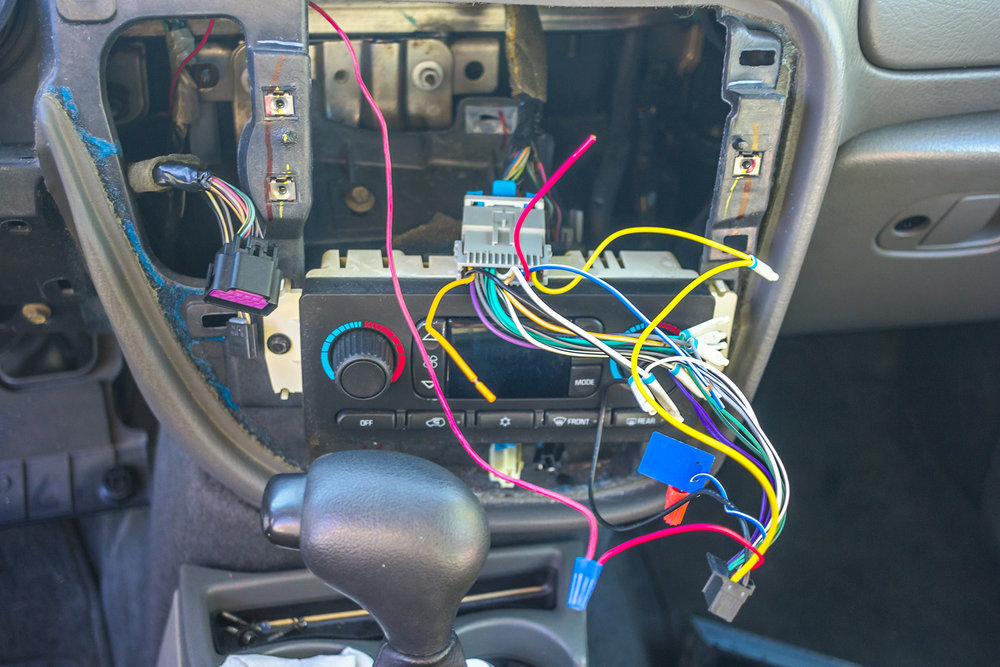
The 2004 Chevrolet Trailblazer is a popular SUV, and like any vehicle, its audio system may require upgrades, repairs, or modifications over time. Understanding the radio wiring harness is crucial for any of these tasks. This article provides a detailed breakdown of the 2004 Trailblazer radio wiring harness, covering its purpose, key components, wiring diagram symbols, functionality, troubleshooting, and safety considerations. We'll empower you with the knowledge to confidently tackle your car audio projects.
Why Understand the Wiring Harness?
The wiring harness is the central nervous system of your car's audio system. Knowing its configuration is essential for several reasons:
- Radio Replacement: Replacing the factory radio with an aftermarket unit requires adapting the existing wiring. Understanding the harness lets you make the necessary connections correctly, preventing damage to your new radio or the vehicle's electrical system.
- Amplifier Installation: Adding an external amplifier to boost your audio requires tapping into the radio's outputs and the vehicle's power supply. The harness diagram shows you where to find these signals.
- Speaker Upgrades: While upgrading speakers may seem straightforward, knowing the wiring color codes helps ensure you maintain proper polarity (positive and negative connections), which is vital for sound quality and preventing damage to your amplifier or speakers.
- Troubleshooting Audio Issues: When your radio stops working, or you experience distorted sound, the wiring harness is the first place to look for problems like loose connections, frayed wires, or shorts.
- Adding Accessories: Integrating Bluetooth adapters, satellite radio receivers, or other audio accessories requires understanding how to tap into the existing system without disrupting its functionality.
Key Specs and Main Parts
The 2004 Trailblazer typically uses a standard 22-pin GM radio connector for the primary radio functions. This connector handles power, ground, speakers, and sometimes, data signals. There may also be a separate connector for the OnStar system (if equipped) and potentially a separate connector for the rear seat entertainment system (if equipped). The number of pins and their specific functions can vary slightly depending on the specific trim level and options of your Trailblazer.
Main Components Connected to the Harness:
- Battery (B+ or 12V Constant): Provides continuous power to the radio for memory retention (presets, clock, etc.). This wire is typically red or yellow.
- Ground (GND): Provides a return path for the electrical current. Usually black or brown.
- Ignition (ACC or Switched 12V): Powers the radio on when the ignition key is turned to the "Accessory" or "On" position. Often a pink or orange wire.
- Speakers (Left Front, Right Front, Left Rear, Right Rear): These pairs of wires (positive and negative) carry the audio signal from the radio to the speakers. Each speaker has its own pair. These wires are usually different color-coded pairs, like white/white-black, gray/gray-black, etc.
- Illumination (ILL): Dims the radio display when the headlights are turned on. Typically orange or gray.
- Antenna (ANT): Connects the radio to the antenna for receiving radio signals. This is usually a coaxial cable terminated with a specific connector.
- OnStar (if equipped): Connects to the OnStar module for emergency communication and other services. This uses a separate connector with a specific set of wires for voice, data, and power.
- Class 2 Data Bus (Serial Data): A communication line that allows the radio to communicate with other vehicle systems, such as the Body Control Module (BCM) or the Driver Information Center (DIC). Often a data signal is needed to keep the factory chime system functional when installing an aftermarket radio.
Understanding Wiring Diagram Symbols
A wiring diagram is a simplified visual representation of the electrical circuit. Here's how to interpret some common symbols:
- Solid Lines: Represent wires. The thickness of the line doesn't usually indicate wire gauge but is merely for visual clarity.
- Dashed Lines: Can represent shielded wires or connections that are not always present, depending on the vehicle's configuration.
- Color Codes: Each wire is labeled with a color abbreviation (e.g., RD for red, BK for black, WH for white, GN for green, BU for blue, YL for yellow, OR for orange). Sometimes, a wire may have a stripe (e.g., WH/BK for white with a black stripe).
- Ground Symbol: A symbol resembling an upside-down triangle or a series of horizontal lines, indicating a connection to the vehicle's chassis ground.
- Connectors: Represented by geometric shapes such as circles, squares, or rectangles. These show where wires are joined together. Pin numbers are often indicated next to the connector symbol.
- Components: Radio, speakers, amplifiers, and other devices are represented by schematic symbols.
- Fuses: A small rectangle with a line through it, indicating a circuit protection device.
How It Works: The Radio Circuit
The radio circuit in the 2004 Trailblazer is relatively straightforward. The battery provides constant power to maintain memory. When the ignition is turned on, the ignition wire provides power to activate the radio. The radio then receives audio signals from the antenna and processes them. The processed audio signal is then amplified and sent to the speakers through the speaker wires. The illumination wire dims the display when the headlights are on, making it easier to see at night. The Class 2 data bus allows the radio to communicate with other vehicle systems, such as displaying information on the Driver Information Center or controlling the factory chime system.
Understanding the signal flow is important for proper diagnosis.
Real-World Use: Basic Troubleshooting
Here are some common audio problems and how the wiring harness can help you diagnose them:
- No Power to Radio: Check the B+ (battery) and ACC (ignition) wires with a multimeter to ensure they are receiving power. Also, check the ground wire for a good connection to the vehicle's chassis. Verify the radio fuse is not blown.
- No Sound from One or More Speakers: Check the speaker wires for continuity (using a multimeter) to ensure they are not broken or shorted. Verify that the speaker itself is not damaged by testing it with another known good source.
- Distorted Sound: Could be caused by a damaged speaker, a loose connection, or an issue with the radio's amplifier. Check the speaker wires for shorts or damage. If using an aftermarket amplifier, verify the gain settings are appropriate.
- Radio Turns Off Intermittently: This could be a loose connection on the B+ or ACC wires, or a faulty ignition switch. Check the wiring harness for any signs of damage or corrosion.
- Dim or No Illumination: Check the illumination wire to ensure it is receiving power when the headlights are turned on. Check the dimmer switch.
Tools You'll Need:
- Multimeter (for checking voltage and continuity)
- Wire strippers/crimpers
- Wiring connectors (butt connectors, T-taps, etc.)
- Electrical tape
- Screwdrivers and sockets (for removing the radio)
- Wiring diagram (which we are providing to you)
Safety Considerations
Working with automotive electrical systems can be dangerous. Always take the following precautions:
- Disconnect the Battery: Before working on any electrical components, disconnect the negative terminal of the battery to prevent short circuits and electrical shocks. This is the most important step.
- Avoid Working on Airbag Circuits: The airbag system is very sensitive and can be triggered by static electricity or improper handling. If you need to work near airbag components, consult a qualified technician.
- Use Proper Tools: Use insulated tools to prevent electrical shocks.
- Work in a Well-Ventilated Area: If you're soldering, work in a well-ventilated area to avoid inhaling harmful fumes.
- Double-Check Your Connections: Before reconnecting the battery, double-check all your wiring connections to ensure they are secure and properly insulated. A short circuit can damage your radio or even start a fire.
- Be Aware of Capacitors: Electronic devices can store electrical charge even after the power is disconnected. Capacitors store electricity and can shock you.
Important: The Class 2 data bus can be sensitive. Improper connections or modifications can disrupt communication between other vehicle systems. If you're unsure about any aspect of the wiring, consult a qualified car audio technician.
By understanding the 2004 Chevy Trailblazer radio wiring harness, you can confidently tackle your car audio projects while ensuring safety and proper functionality. Remember to always double-check your work and consult a professional if you have any doubts.
We have the wiring diagram file available. You can download it and use it as a reference while working on your car.