
2006 Chevy Silverado Tail Light Wiring Diagram
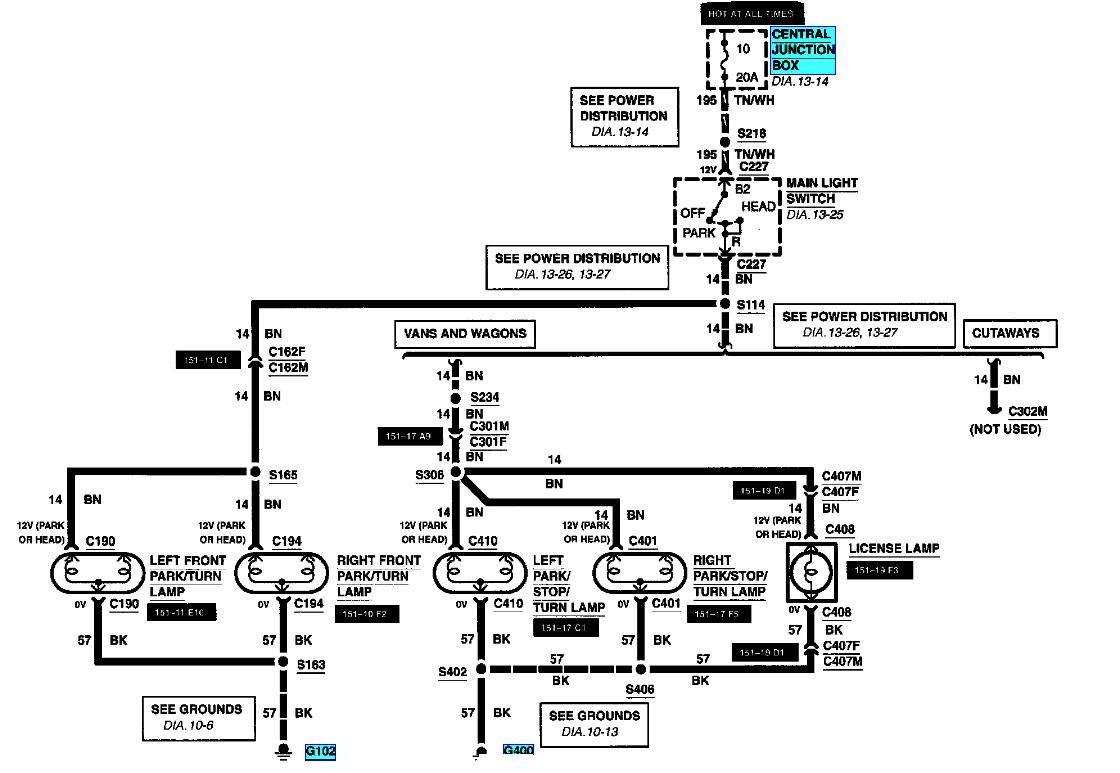
Working on your 2006 Chevy Silverado's tail lights? Whether you're chasing down a pesky electrical problem, planning a custom LED upgrade, or just trying to understand how those lights keep you safe and legal, having a reliable wiring diagram is absolutely essential. This article will break down the 2006 Chevy Silverado tail light wiring diagram, explaining its components, symbols, and how it all comes together. We'll focus on models produced in 2006, as there can be slight variations between model years. This document will empower you to troubleshoot effectively and confidently tackle DIY projects related to your truck's tail lights.
Purpose of the Wiring Diagram
Think of the wiring diagram as a roadmap for the electrical system in your Silverado's tail lights. It's much more than just a collection of lines and symbols. Its primary purposes are:
- Diagnosis and Repair: Locating shorts, open circuits, or malfunctioning components is virtually impossible without a diagram. It allows you to trace the path of electricity, pinpoint problems, and test individual circuits.
- Modification and Upgrades: If you're installing aftermarket tail lights, LED conversions, or adding trailer wiring, the diagram shows you where to tap into the existing system and ensures compatibility.
- Understanding the System: Even if you don't have a specific problem, the diagram provides a valuable overview of how the tail light system functions, including the relationships between different components.
Key Specs and Main Parts
The 2006 Silverado's tail light system is relatively straightforward, but understanding the core components is critical. Here's a breakdown:
- Tail Light Assembly: This includes the housing and the various bulbs (or LEDs in aftermarket units) for the tail lights, brake lights, turn signals, and backup lights.
- Bulbs: Standard incandescent bulbs are typically used, but many owners upgrade to LED bulbs for improved brightness and longevity. The bulb types are often 3157 for brake/tail and turn, and 3156 for reverse.
- Sockets: The sockets hold the bulbs in place and provide the electrical connection.
- Wiring Harness: A bundle of wires that carries the electrical signals from the vehicle's electrical system to the tail light assembly. These are often color-coded.
- Connectors: Connectors join different sections of the wiring harness together. They are typically multi-pin connectors and are sometimes located near the frame or inside the tail light housing.
- Fuses: Crucial safety devices that protect the electrical circuits from overloads. The tail light circuit will have its own fuse, typically located in the under-hood or inside the cab fuse box.
- Light Switch: The headlight switch controls power to the tail lights when the headlights are on.
- Brake Light Switch: Located on the brake pedal assembly, this switch activates the brake lights when the brake pedal is pressed.
- Turn Signal Switch: Part of the steering column assembly, this switch controls the left and right turn signals.
- Body Control Module (BCM): The BCM is a computer that controls various vehicle functions, including some aspects of the lighting system. While not directly in the tail light assembly, the BCM often interfaces with the turn signal and brake light circuits.
Understanding the Wiring Diagram Symbols
The wiring diagram uses a standardized set of symbols to represent different components and connections. Familiarizing yourself with these symbols is key to interpreting the diagram correctly.
- Lines: Solid lines represent wires. Dashed lines may represent shielded wires or wires that are part of a circuit board. The thickness of the line doesn't usually signify anything specific (like wire gauge) on standard vehicle diagrams.
- Colors: Wires are color-coded to make it easier to identify them. Common colors include:
- Black (BLK): Ground
- Brown (BRN): Tail Lights
- Yellow (YEL): Left Turn Signal/Brake
- Dark Green (DRK GRN): Right Turn Signal/Brake
- Light Green (LT GRN): Reverse Lights
- White (WHT): Often used for grounds or other signal wires
- Circles: Represent electrical terminals or connectors. Sometimes a number inside the circle indicates the terminal number.
- Squares/Rectangles: Often represent components like relays, switches, or modules (like the BCM).
- Resistors: A zig-zag line represents a resistor.
- Ground Symbol: Looks like an inverted triangle or a series of horizontal lines getting shorter.
- Fuse Symbol: A squiggly line inside a rectangle.
- Diode Symbol: A triangle pointing to a line. Diodes allow current to flow in only one direction.
- Splice Symbol: A dot where multiple wires connect. Important: A simple crossing of lines without a dot *doesn't* mean they're connected.
How It Works: A Circuit-Level Explanation
Let's consider a simplified example of the brake light circuit:
- When you press the brake pedal, the brake light switch closes, completing the circuit.
- This sends power from the battery (through a fuse, for protection) to the brake light bulbs in both tail light assemblies.
- The brake light bulbs light up, signaling other drivers that you're slowing down.
- The current then flows from the bulbs to ground, completing the circuit.
The turn signal circuit is a bit more complex, as it involves the turn signal switch, flasher unit (or the BCM controlling the flashing), and the turn signal bulbs in both the front and rear. The tail light circuit is typically powered whenever the headlights are on, providing a constant light source. The reverse lights are activated by the reverse light switch on the transmission when the vehicle is shifted into reverse.
Real-World Use: Basic Troubleshooting Tips
Here's how you can use the wiring diagram to troubleshoot common tail light problems:
- No Tail Lights: Check the tail light fuse first. If the fuse is blown, replace it. If it blows again, there's a short circuit somewhere. Use the diagram to trace the wiring and look for damaged wires or components.
- One Tail Light Out: Start by replacing the bulb. If that doesn't work, check the socket for corrosion or damage. Use a multimeter to test for voltage at the socket. If there's no voltage, trace the wiring back to the connector or fuse box, consulting the diagram to identify the path.
- Turn Signal Not Working: Check the turn signal bulb first. If that's good, check the flasher unit (or BCM function if applicable) and the turn signal switch. Use the diagram to identify the wiring and components related to the turn signal circuit.
- Brake Lights Not Working: Check the brake light bulbs and the brake light switch. Use a multimeter to test for voltage at the brake light switch and the brake light sockets. The diagram will help you trace the wiring.
- Dim or Flickering Lights: Often indicates a poor ground connection. Check the ground wires for corrosion or loose connections. The diagram will show you the ground locations.
A test light can also be used, but a multimeter offers more precise measurements.
Safety Precautions
Working with electrical systems can be dangerous. Here are some essential safety precautions:
- Disconnect the Battery: Always disconnect the negative battery terminal before working on any electrical components. This will prevent accidental shorts and shocks.
- Use Proper Tools: Use insulated tools designed for electrical work.
- Be Careful with Fuses: Never replace a fuse with one of a higher amperage. This can overload the circuit and cause a fire.
- Avoid Water: Never work on electrical systems in wet conditions.
- Be Mindful of Airbags: Some wiring related to the tail lights may be routed near airbag sensors or modules. Be extremely careful when working in these areas to avoid accidentally deploying an airbag.
- Consult a Professional: If you're not comfortable working on electrical systems, consult a qualified mechanic.
The 2006 Chevy Silverado tail light wiring diagram is an invaluable tool for diagnosing and repairing electrical problems, performing modifications, and understanding the functionality of your truck's lighting system. By familiarizing yourself with the symbols, components, and circuits, you can confidently tackle DIY projects and keep your Silverado running safely and legally.
We have a copy of the 2006 Chevy Silverado tail light wiring diagram available for download. Please contact us with your vehicle's sub-model (e.g., 1500, 2500HD, etc.) and cab configuration (e.g., Regular Cab, Extended Cab, Crew Cab) to ensure you receive the correct diagram.