
2012 Jeep Grand Cherokee Radio Wiring Harness
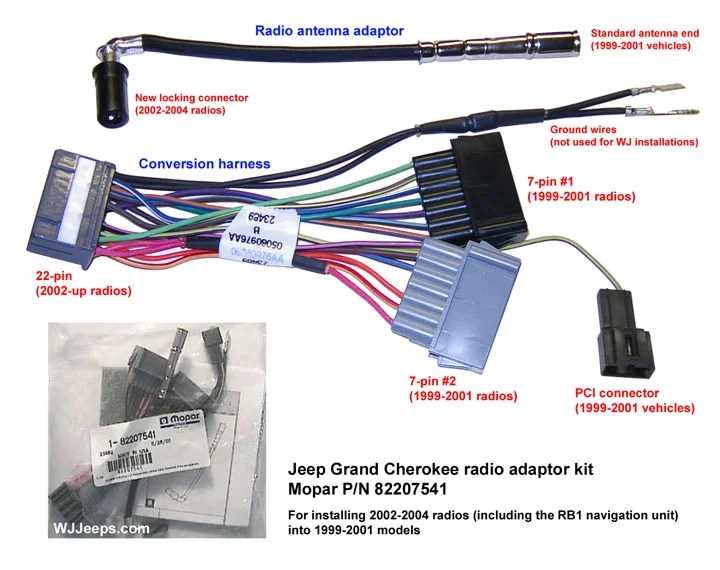
Alright, let's dive into the 2012 Jeep Grand Cherokee radio wiring harness. Whether you're upgrading your sound system, troubleshooting a speaker issue, or just trying to understand how your car's audio is wired, understanding this harness is crucial. This isn't a simple plug-and-play system; it's a complex network of wires that interact with the car's computer, and knowing your way around it can save you time, money, and a whole lot of frustration.
Purpose of Understanding the Radio Wiring Harness
Why bother learning about this? Several reasons come to mind. First and foremost, if you're planning to install an aftermarket radio, amplifier, or speakers, you'll need to interface with the existing wiring. Simply cutting wires without knowing what they do is a recipe for disaster, possibly causing damage to your car's electrical system or disabling other features. Even something as simple as adding a backup camera might require tapping into specific wires within the radio harness. Furthermore, being able to read the diagram empowers you to diagnose audio problems yourself, potentially saving hundreds of dollars in diagnostic fees from a mechanic.
Consider the scenario where your speakers suddenly stop working. Instead of blindly replacing the radio, you can use the wiring diagram to check the continuity of the speaker wires and identify any shorts or open circuits. Or perhaps you want to add a subwoofer. The diagram will show you which wires to tap into for the remote turn-on lead and the audio signal.
Key Specs and Main Parts of the 2012 Jeep Grand Cherokee Radio Wiring Harness
The 2012 Grand Cherokee utilizes a CAN bus (Controller Area Network) system for communication between various modules, including the radio. This means that the radio doesn't just receive power and audio signals; it also communicates with the vehicle's computer for functions like steering wheel controls, vehicle speed-sensitive volume, and more. The key components you'll encounter are:
- Power Wires: These provide the necessary voltage for the radio to operate. You'll typically find a constant 12V (for memory retention) and a switched 12V (that turns on with the ignition).
- Ground Wire: Provides the return path for the electrical current.
- Speaker Wires: These carry the audio signal from the radio to the speakers. Each speaker (front left, front right, rear left, rear right) will have a positive (+) and a negative (-) wire.
- CAN Bus Wires: These are the communication lines that allow the radio to interact with the car's computer. They usually come as a twisted pair to minimize interference.
- Antenna Wire: Connects to the antenna for receiving radio signals.
- Remote Turn-On Wire (Optional): If you're adding an amplifier, this wire provides a 12V signal to turn the amplifier on and off with the radio.
- Steering Wheel Control Wires: Allow the steering wheel buttons to control the radio functions.
The harness itself consists of multiple connectors that plug into the back of the radio. These connectors are usually color-coded or keyed to prevent incorrect connections. However, relying solely on color codes can be misleading, as they can vary slightly depending on the trim level and specific options of your Grand Cherokee. Always double-check with the wiring diagram.
Symbols – Understanding the Wiring Diagram
A wiring diagram uses standardized symbols to represent electrical components and connections. Here's a breakdown of some common symbols you'll encounter:
- Solid Lines: Represent wires. The thickness of the line may indicate the wire gauge (size).
- Dashed Lines: May represent shielded wires or connections that are not directly part of the main circuit.
- Circles: Represent connectors or terminals.
- Squares/Rectangles: Represent components like the radio itself, speakers, or modules.
- Ground Symbol (looks like an upside-down tree): Indicates a connection to ground.
- Fuse Symbol (a jagged line inside a rectangle): Represents a fuse.
- Resistor Symbol (a zigzag line): Represents a resistor.
- Capacitor Symbol (two parallel lines): Represents a capacitor.
Color codes are also crucial. Each wire is typically identified by a colored insulation, and the diagram will provide a key indicating what each color represents. For example, a red wire might be a constant 12V power supply, while a black wire is usually ground. A white/blue wire might be a specific signal wire. Understanding these color codes is essential for identifying and testing the correct wires.
How It Works: The Audio Signal Path and CAN Bus Interaction
The radio receives power from the battery and ignition switch. When you turn on the radio, it powers up and begins receiving radio signals through the antenna. The radio processes these signals and amplifies them. The amplified audio signal is then sent to the speakers through the speaker wires. Each speaker receives a positive and negative signal, which causes the speaker cone to vibrate and produce sound. That is how traditional radio signal path works.
But the 2012 Grand Cherokee is more sophisticated. The CAN bus system allows the radio to communicate with other modules in the car. For example, when you adjust the volume using the steering wheel controls, the steering wheel control module sends a signal to the radio via the CAN bus. The radio then interprets this signal and adjusts the volume accordingly. Similarly, the vehicle speed sensor sends information to the radio, which can then adjust the volume automatically based on the vehicle's speed (speed-sensitive volume). The radio can also display information from other modules, such as tire pressure or navigation data, if equipped.
Real-World Use – Basic Troubleshooting Tips
Here are some common troubleshooting scenarios and how the wiring diagram can help:
- No Power to Radio: Check the fuses related to the radio. Use a multimeter to verify that you have 12V at the constant and switched power wires. If not, trace the wires back to the fuse box and identify any breaks or shorts.
- No Sound from Speakers: Check the speaker wires for continuity. Use a multimeter to measure the resistance of the speaker coil. An open circuit indicates a blown speaker. Also, check for shorts to ground.
- Steering Wheel Controls Not Working: Verify that the CAN bus wires are properly connected. Check for any error codes related to the CAN bus system. Consult the wiring diagram to ensure that the steering wheel control wires are properly connected to the radio.
- Distorted Sound: Could be a blown speaker, a loose connection, or a problem with the radio's amplifier. Check the speaker wires for shorts or loose connections. Try replacing the speaker to see if that resolves the issue.
Safety – Highlighting Risky Components
Working with automotive electrical systems can be dangerous. Always disconnect the negative terminal of the battery before working on the wiring. This will prevent accidental shorts and potential damage to the car's electrical system. Be especially careful when working with the airbag system. Disconnecting or tampering with airbag wiring can cause the airbags to deploy unexpectedly, resulting in serious injury. If you're not comfortable working with the electrical system, it's best to consult a qualified technician.
Remember, some components, like the radio itself, can store a small electrical charge even after the battery is disconnected. It's best to wait a few minutes after disconnecting the battery before handling any electrical components.
Also, be aware of the potential for electrical shock when working with live wires. Never work on the electrical system in wet conditions. Always use insulated tools to prevent accidental shorts.
This overview provides a strong foundation for understanding the 2012 Jeep Grand Cherokee radio wiring harness. With the diagram in hand, you'll be well-equipped to tackle audio upgrades, troubleshoot problems, and gain a deeper understanding of your vehicle's electrical system.