
Air Compressor Pressure Switch Wiring Diagram
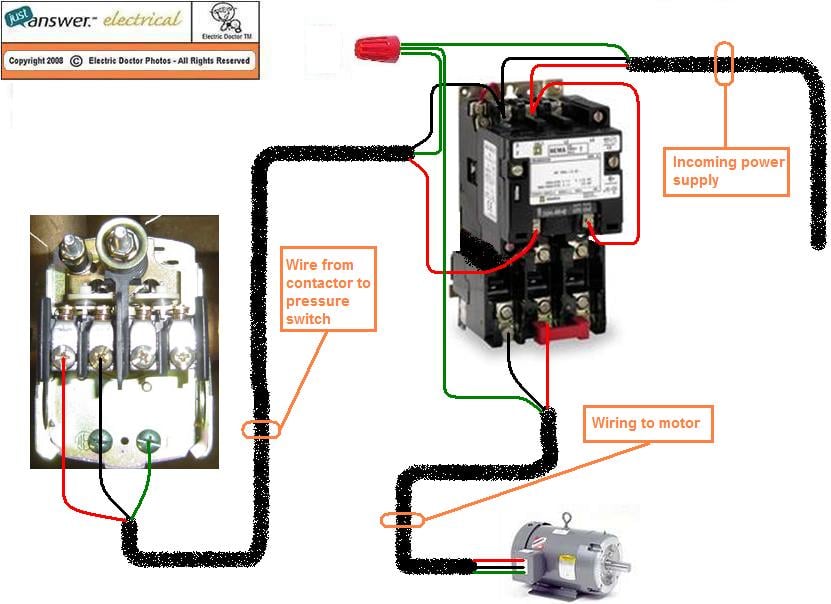
Understanding the wiring diagram of your air compressor's pressure switch is crucial for any serious DIY mechanic or modder. Whether you're troubleshooting a malfunctioning compressor, upgrading its capabilities, or simply expanding your knowledge of pneumatic systems, having a firm grasp of how the pressure switch is wired is essential. This article will break down the typical wiring diagram, covering its components, functionality, and potential troubleshooting steps. We even have a downloadable diagram available for you to use.
Purpose of the Air Compressor Pressure Switch Wiring Diagram
Why bother learning about this diagram? Several reasons:
- Repair & Maintenance: The most common reason is to diagnose and repair a faulty air compressor. Problems like the compressor not turning on, not shutting off, or experiencing pressure fluctuations can often be traced back to the pressure switch or its wiring.
- Upgrades & Modifications: Planning to upgrade your compressor with a larger tank, different motor, or add auxiliary components? Understanding the wiring allows you to safely integrate these modifications.
- Educational Value: Even if your compressor is working perfectly, learning about the wiring helps you understand the fundamental principles of electrical control in pneumatic systems. This knowledge is transferable to other mechanical systems as well.
- Safety: Working with electricity can be dangerous. Knowing the wiring allows you to safely disconnect and test components before attempting any repairs or modifications.
Key Specifications and Main Parts
Before diving into the diagram itself, let's define the key components you'll encounter:
- Pressure Switch: This is the brains of the operation. It's a mechanical switch that opens or closes its contacts based on the air pressure inside the tank. It has an adjustable range (cut-in and cut-out pressure).
- Motor: The electric motor drives the compressor pump. Its horsepower (HP) and voltage (V) are critical specifications.
- Power Source: Typically, your household AC power (120V or 240V depending on your location and compressor size).
- Start Capacitor (if applicable): Some compressors, especially those with larger motors, use a start capacitor to provide an extra surge of power during startup.
- Run Capacitor (if applicable): Some compressors also use a run capacitor to improve the motor's efficiency and performance.
- Unloader Valve: This valve relieves pressure from the compressor head when the motor stops, making it easier to start again. It is often integrated or near the pressure switch.
- Check Valve: A one-way valve that prevents air from flowing back from the tank into the compressor pump.
- Wiring (Wires, Connectors, Terminals): The pathway for electricity. Wire gauge (thickness) is crucial and must be appropriate for the amperage.
- Thermal Overload Protection: A safety device (often internal to the motor) that shuts down the motor if it overheats, preventing damage.
- Main Power Switch: An on/off switch to safely disconnect the compressor from the power supply.
Symbols in the Wiring Diagram
Understanding the symbols used in the wiring diagram is vital for interpreting it correctly. Here are some common ones:
- Solid Lines: Represent wires. Thicker lines may indicate heavier gauge wires.
- Dashed Lines: Often represent pneumatic lines (air hoses).
- Circles with "M" inside: Represent the electric motor.
- Rectangle with wavy lines: Represents a resistor, which can be part of the start/run capacitor circuit.
- Capacitor Symbol (two parallel lines): Represents a capacitor (start or run).
- Switch Symbol (line with a break): Represents a switch (pressure switch, on/off switch). A tilted line across the break indicates a normally open (NO) switch; a line connecting the two points indicates a normally closed (NC) switch.
- Ground Symbol (series of descending horizontal lines): Indicates a connection to ground.
- Color Coding: Colors are *extremely* important. Common colors include:
- Black (BLK): Hot wire (power).
- White (WHT): Neutral wire.
- Green (GRN): Ground wire.
- Red (RED): Often used for switched power or control circuits.
- Blue (BLU) / Yellow (YEL): Can be used for various control circuits.
- Terminal Markings: Terminals on the pressure switch, motor, and other components are usually marked with numbers or letters (e.g., L1, L2, T1, T2). These markings are crucial for proper wiring.
Important Note: Wire color codes can vary slightly depending on the manufacturer and country. Always refer to the specific wiring diagram for your compressor.
How It Works: A Step-by-Step Explanation
Here's a simplified explanation of how the air compressor's pressure switch circuit typically works:
- Power On: You flip the main power switch, sending electricity to the circuit.
- Pressure Switch Engaged: When the tank pressure is below the cut-in pressure, the pressure switch contacts are closed (or in some designs, open). This allows electricity to flow to the motor.
- Motor Runs: The motor starts, driving the compressor pump and filling the air tank.
- Pressure Builds: As the tank pressure increases, it exerts force on the pressure switch's diaphragm.
- Pressure Switch Disengages: When the tank pressure reaches the cut-out pressure, the pressure switch contacts open (or close, depending on the design), cutting off power to the motor.
- Motor Stops: The motor stops running. The unloader valve releases pressure from the compressor head.
- Cycle Repeats: As air is used and the tank pressure drops below the cut-in pressure, the pressure switch re-engages, and the cycle repeats.
Real-World Use: Basic Troubleshooting Tips
Here are a few common problems and how the wiring diagram can help you troubleshoot:
- Compressor Won't Start:
- Check the main power switch.
- Verify power is reaching the compressor (use a multimeter).
- Inspect the pressure switch contacts for corrosion or damage. Use the diagram to identify the correct terminals to test.
- Check the thermal overload protection (if applicable). It may need to be reset.
- Test the motor windings for continuity (using a multimeter).
- Examine the start capacitor (if applicable) for signs of bulging or damage.
- Compressor Won't Shut Off:
- Check the pressure switch for proper adjustment. The cut-out pressure may be set too high, or the switch may be malfunctioning.
- Inspect the pressure switch for debris or damage that could be preventing it from opening.
- Compressor Runs Constantly:
- Check for air leaks in the tank, hoses, or fittings.
- Inspect the check valve to ensure it's not leaking backward.
When troubleshooting, always disconnect the power before working on any electrical components.
Safety Considerations
Working with electricity is inherently dangerous. Here are some key safety precautions:
- Disconnect Power: Always disconnect the air compressor from the power source before working on any electrical components.
- Verify Disconnection: Use a multimeter to verify that the power is indeed disconnected.
- Capacitors: Capacitors can store a dangerous amount of electricity, even after the compressor is disconnected. Discharge capacitors before handling them. A resistor can be used for this (consult a qualified electrician if you are unsure how to do this safely).
- Proper Tools: Use insulated tools designed for electrical work.
- Proper Wiring: Ensure that all wiring is properly insulated and connected. Use appropriately sized wire for the amperage.
- Grounding: Make sure the compressor is properly grounded.
- If Unsure, Seek Professional Help: If you are not comfortable working with electricity, consult a qualified electrician.
The pressure switch itself handles high voltage and amperage. Improper handling can lead to electric shock or fire.
Now that you're armed with this knowledge, you can confidently approach troubleshooting and maintenance tasks related to your air compressor's pressure switch. Remember to always prioritize safety and consult the specific wiring diagram for *your* compressor model. You can download a generic air compressor pressure switch wiring diagram we have prepared here.